


Facebook not loading site content properly.

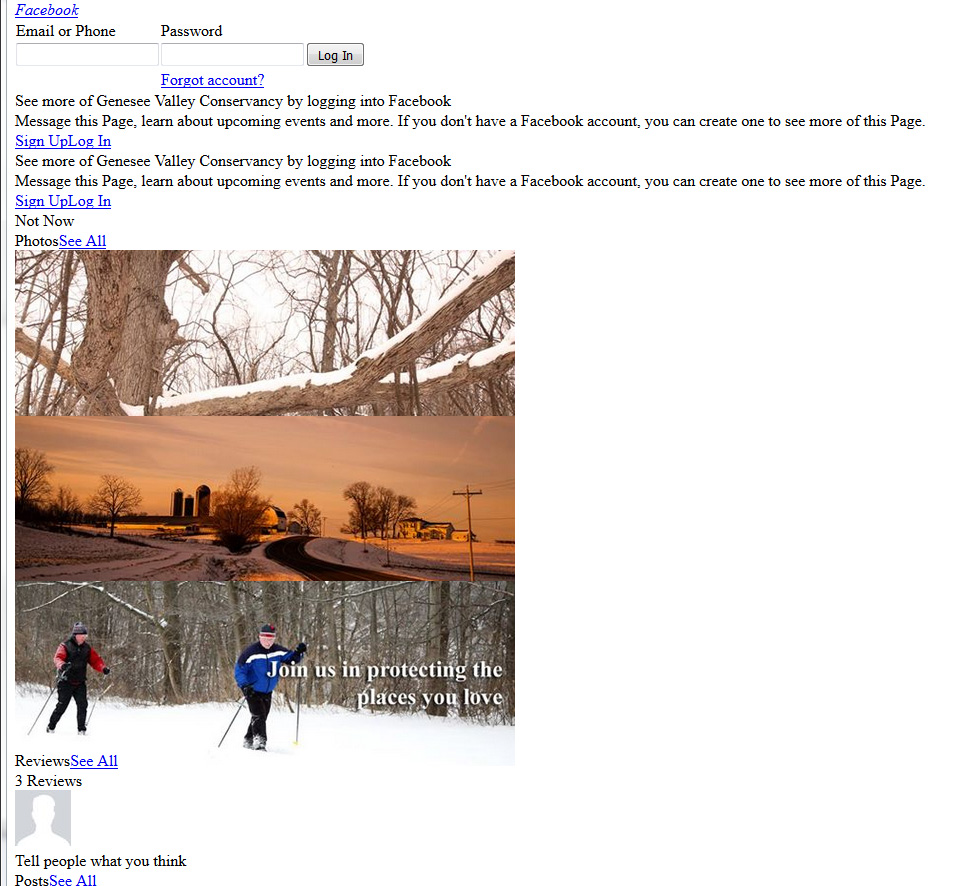
For the past few weeks, facebook does not load properly. See screenshot for what I see. No other issues on any other sites. If I load facebook on windows explorer it loads fine.
Any suggestions?
All Replies (2)
Here is a screenshot of what facebook looks like.
Isisombululo Esikhethiwe
It looks that some CSS files are blocked.
You can reload web page(s) and bypass the cache to refresh possibly outdated or corrupted files.
- Hold down the Shift key and left-click the Reload button
- Press "Ctrl + F5" or press "Ctrl + Shift + R" (Windows,Linux)
- Press "Command + Shift + R" (Mac)
What security software do you have? Make sure that your security software isn't blocking content.
You can check the Web Console (Firefox/Tools > Web Developer) for error messages about blocked and unsafe content. You can check the Network Monitor to see if content is blocked or otherwise fails to load.
You can use "Ctrl+F5" or "Ctrl+Shift+R" to reload the page and bypass the cache to generate a fresh log.