


My firefox has been broken! how can I solve this?

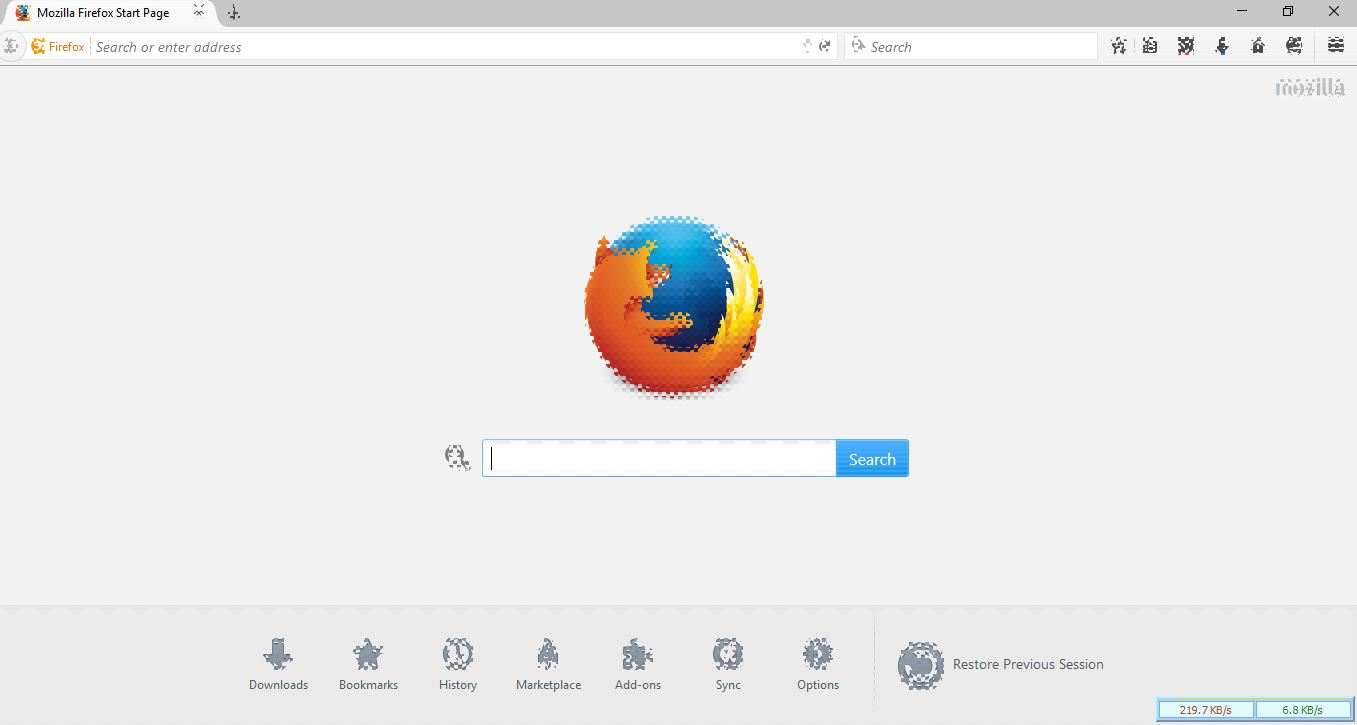
In my picture, you can see that my browser was broken....
I can't Understands that, how can I solve this. In this cause, I can not use my fevourite browser in windows 10 pro 64 bit.
I wish, You will help me as soon as possible....
Thanks in advanced for help me...........
All Replies (3)
Isisombululo Esikhethiwe
hello, maybe that's an issue with hardware acceleration - please try updating your graphics driver, or in case this doesn't solve the issue or there is no new version available at the moment, disable hardware acceleration in the firefox menu ≡ > options > advanced > general (that setting will take a restart of the browser to take effect).

Hello, Try disabling graphics hardware acceleration.
You will need to restart Firefox for this to take effect so save all work first (e.g., mail you are composing, online documents you're editing, etc.).
Then perform these steps:
- Click the menu button
 and select Options on Windows or Preferences on Mac or Linux.
- Select the Advanced panel and then the General tab.
- Uncheck Use hardware acceleration when available.
- Restart Firefox and see if the problems persist.
Did this fix your problems? Please report back to us!
If the problem is resolved, you should check for updates for your graphics driver by following the steps mentioned in these Knowledge base articles:
Thank you.
edit philipp is faster, one more time :-)
Okulungisiwe ngu ideato
Thanks again Philipp! Now I can solve this for your advice.
Also thanks to ideato..