


Windows 10 reached EOS (end of support) on October 14, 2025. If you are on Windows 10, see this article.

Search Support

Avoid support scams. We will never ask you to call or text a phone number or share personal information. Please report suspicious activity using the “Report Abuse” option.

Learn More

Lolu chungechunge lwabekwa kunqolobane. Uyacelwa ubuze umbuzo omusha uma udinga usizo.

I don't want Firefox to update.

  • 1 baphendule
  • 1 inale nkinga
  • 58 views
  • Igcine ukuphendulwa ngu I.T_guy

I installed FF 28. During the installation, I disabled the suto-updater. At first run, I dsiabled it AGAIN in the config. And still, it auto-updated to 30.

So, I uninstalled and reinstalled 28. And AGAIN it's updated automatically.

I don't care about ESR. I don't want to update to the new graphical style. I don't care if 28 has exploits. EVERY PROGRAM HAS HOLES AND CAN BE EXPLOITED!

So, I'd be grateful if anyone could explain to me why the program updated even after I set it to NOT do it. Twice.

I installed FF 28. During the installation, I disabled the suto-updater. At first run, I dsiabled it AGAIN in the config. And still, it auto-updated to 30. So, I uninstalled and reinstalled 28. And AGAIN it's updated automatically. I don't care about ESR. I don't want to update to the new graphical style. I don't care if 28 has exploits. EVERY PROGRAM HAS HOLES AND CAN BE EXPLOITED! So, I'd be grateful if anyone could explain to me why the program updated even after I set it to NOT do it. Twice.

All Replies (1)

Please do the following

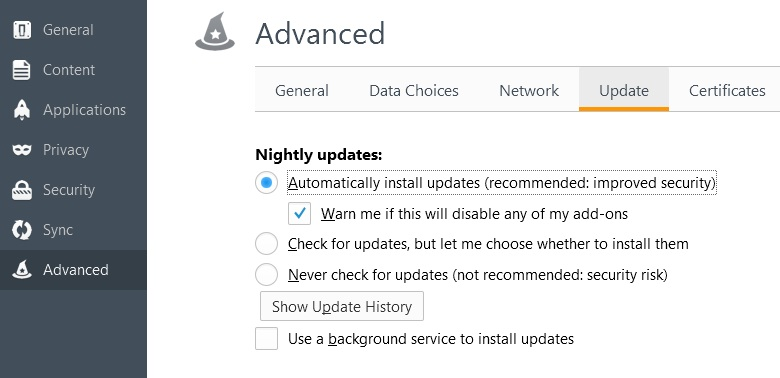
Go to your "Options" then under "Advance" tab you will find at the top a tab "Update" there you will find all the options.

If you turn it off there and it doesn't want to work then i suggest looking for viruses.
Okulungisiwe ngu I.T_guy