


Can't increase cache size, though i set it to 500mb it shows 27.65mb,what should i do??

i am unable to increase cache size. whatever i put in the setting it says max cache limit 27.65 mb. I have 3 gb ram and 200 gb hard disk.
被選擇的解決方法
- Press Alt+T
- Click on Options
- Point to Advanced category
- Under this select Network
- Check the box "Override automatic cache management"
- Enter your desired value.

Note: If anyone's reply has solved your problem, then please mark that reply as "Solved It" to the right of that reply after logging in your account. It will help us to concentrate on new questions. 從原來的回覆中察看解決方案 👍 7
所有回覆 (7)
選擇的解決方法
- Press Alt+T
- Click on Options
- Point to Advanced category
- Under this select Network
- Check the box "Override automatic cache management"
- Enter your desired value.
Note: If anyone's reply has solved your problem, then please mark that reply as "Solved It" to the right of that reply after logging in your account. It will help us to concentrate on new questions.
but there is no "Override automatic cache management" option. i'm using version 3.6.16 kk...solved it....i was using private browsing....stopped it and working fine...
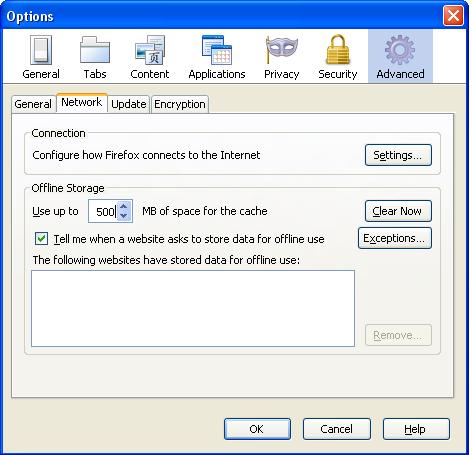
由 ar_itra 於 修改
The automatic setting is for Firefox 4.
The cache in Firefox 3 versions is quite limited and only allows 8192 cache entries and a maximum for a file size of 64 MB. So it is possible that you exceed the maximum amount of cache entries and in that case the cache usage won't increase.
You can inspect the current cache usage on the about:cache page. You can open that page via the location bar.
kk...understood
Mark the question as solved. Please!
now i installed firefox 4 but still same
kk...solved it....i was using private browsing....stopped it and working fine...