


Form Field prompting with wrong username (never saved for this site)

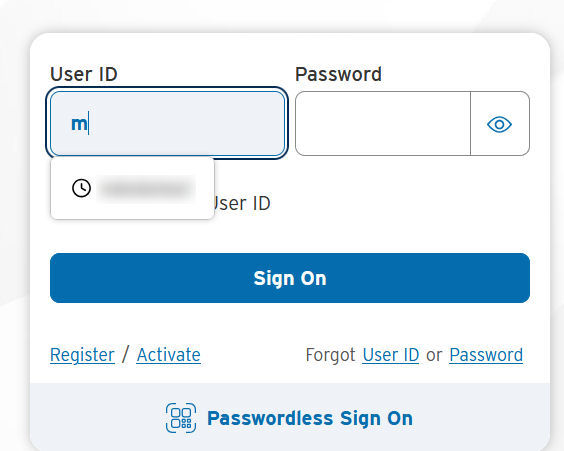
One of my "Login required" sites (Call it Site One) is prompting me with a username when I click into the Username entry box. Unfortunately, the username it's prompting me for is from "Site Two".
I have never saved a username for Site One. The username it's prompting me with is from a completely different domain name, Site Two.
I searched Usernames/passwords and found only one occurrence for the username it is prompting with. It's properly listed under the correct Site Two. I deleted it anyway to test. That made no difference: it still appears in the drop down for Site One (after restarting Firefox).
Just to be clear: Site One has no stored usernames or passwords. I've never stored a username or password for Site One. I have done so for Site Two (but again, that's now deleted). Yet this username, which is now not stored anywhere in Firefox, is still appearing as a prompt for Site One.
Lastly, this is not a new issue. This problem dates back months.
選擇的解決方法
I'm afraid the "clock" icon would really signify it's pulling plaintext form history and not login credentials in this case. I would expect citi to be coded correctly, but it might have been the "other" site that had one of its forms insecure, and this history got saved for "username" ID types in general.
You might be able to remove the history item by just pressing arrows in the dropdown to highlight the autofill item, and pressing Delete (or Shift + Delete eventually) — see similar support.mozilla.org/questions/1362164
This data is otherwise stored in "Saved form info" content in clear browsing history dialogs, if you end up removing everything in the end.
所有回覆 (6)
Does it fill the same way as other usernames & passwords (e.g. if you have primary password you get asked for one, or system keychain unlock) — or it appears more like a plain input autocomplete like you might get for search fields that's pulled from history of similar inputs?
(I.e. it's possible the site is coded in a way the form is not seen as secure/sensitive, and the autofill offered is not from credentials, but just plaintext form history…)
delete duplicate post
由 MozzieBob 於 修改
delete duplicate post
由 MozzieBob 於 修改
(This answer may appear twice. The forum appeared to delete it when I Edit/updated the answer with additional info). I can't see the post at all now. Reposting).
Interesting point, but it appears to be a username field. See the attached image.
This is at citi.com, so I'm guessing it's probably coded correctly.
I searched through the auto-fill and username/passwords in Settings and can find no mention of the username that's still appearing.
Checking the code for the form field, it is a type=text field as opposed to a password field... but that's expected.
The site (citi.com) is listed in the "don't save user/pass for this site" properly listed.
EDIT: I also just cleared my temp cache and removed the cookies for the citi.com web site just in case it was citibank actually loading it. Restarted. No change.
選擇的解決方法
I'm afraid the "clock" icon would really signify it's pulling plaintext form history and not login credentials in this case. I would expect citi to be coded correctly, but it might have been the "other" site that had one of its forms insecure, and this history got saved for "username" ID types in general.
You might be able to remove the history item by just pressing arrows in the dropdown to highlight the autofill item, and pressing Delete (or Shift + Delete eventually) — see similar support.mozilla.org/questions/1362164
This data is otherwise stored in "Saved form info" content in clear browsing history dialogs, if you end up removing everything in the end.
Hey, thanks. Makes sense. Shift-Delete did it.
It's odd: I compared other secure sites to see if that little symbol appeared in similar "secure" prompts. It did... so I guess that says something.