


Windows 10 reached EOS (end of support) on October 14, 2025. If you are on Windows 10, see this article.

搜尋 Mozilla 技術支援網站

防止技術支援詐騙。我們絕對不會要求您撥打電話或發送簡訊,或是提供個人資訊。請用「回報濫用」功能回報可疑的行為。

了解更多

ChromeOS and firefox

  • 2 回覆
  • 0 有這個問題
  • 124 次檢視
  • 最近回覆由 hessian13
  • Open

[https://support.mozilla.org/en-US/kb/.../run-firefox-chromeos?utm_source=www.firefox.com&utm_medium=referral&utm_campaign=desktop-browsers-chromebook&utm_content=seo]

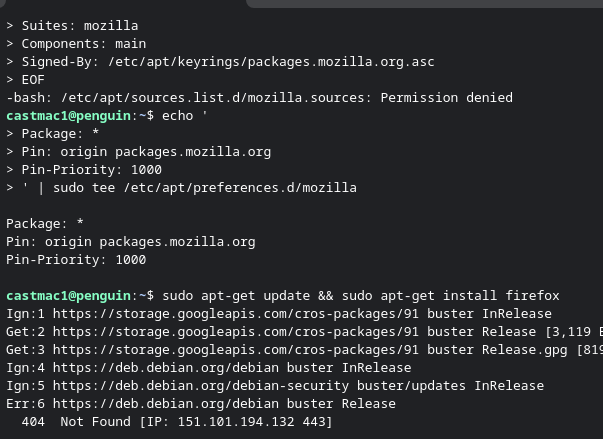
I am trying to follow the guide linked to install Firefox on an older Chromebook. It looks like the device should be supported, as running the command cat /etc/os-release returns that it is version 10. When I get to step 4 and try and run that I get a permission denied error and later steps do not work.

I did try the Google play option on the Chromebook, it says the device is not supported.

[[https://support.mozilla.org/en-US/kb/run-firefox-chromeos?utm_source=www.firefox.com&utm_medium=referral&utm_campaign=desktop-browsers-chromebook&utm_content=seo|https://support.mozilla.org/en-US/kb/run-firefox-chromeos?utm_source=www.firefox.com&utm_medium=referral&utm_campaign=desktop-browsers-chromebook&utm_content=seo]] I am trying to follow the guide linked to install Firefox on an older Chromebook. It looks like the device should be supported, as running the command cat /etc/os-release returns that it is version 10. When I get to step 4 and try and run that I get a permission denied error and later steps do not work. I did try the Google play option on the Chromebook, it says the device is not supported.

所有回覆 (2)

Hi,

Step 4 just creates a text file. If you get a permission denied error, try selecting a more privileged user or adjust directory permissions. Either way, this error shouldn't be related to Firefox.

When I copy and paste step 4 is when I get the error. If I manually type it all in without adding newlines and hit enter I get a ">" "cat <<EOF > /etc/apt/sources.list.d/mozilla.sources Types: deb URIs: https://packages.mozilla.org/apt Suites: mozilla Components: main Signed-By: /etc/apt/keyrings/packages.mozilla.org.asc EOF "

If I try and skip to step 6 it also gives me a bunch of 404. It looks like only a terminal is installed, so I do not know how to translate the lines in step 4 to make it into the file.
問個問題

如果您還沒有帳號,您必須先登入帳號 來回覆文章。還沒有帳號的話,只能發問新問題