Modiy behaviour of standard toolbar button

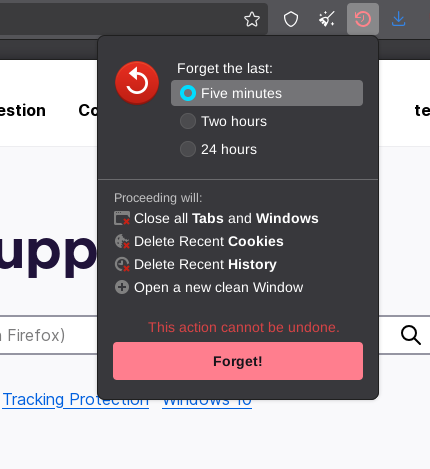
When customizing the toolbar, Firefox has a standard button named "Forget" which lets you easily delete browser data (see the attached image).
I'm using this button, but I should like the button to work in a different way. What I want is that everything except from browser history is deleted, when I click the forget icon. It should not be necessary to first click the forget icon, and then "Forget!" (as in the attached image). I don't neither want to restart the browser or open a new clean window
Does someone know how to achieve this without developing my own plugin? Does the standard buttons have some scripts somewhere that can be edited?
When customizing the toolbar, Firefox has a standard button named "Forget" which lets you easily delete browser data (see the attached image).
I'm using this button, but I should like the button to work in a different way. What I want is that everything except from browser history is deleted, when I click the forget icon. It should '''not''' be necessary to first click the forget icon, and then "Forget!" (as in the attached image). I don't neither want to restart the browser or open a new clean window
Does someone know how to achieve this without developing my own plugin? Does the standard buttons have some scripts somewhere that can be edited?