Dropdown Menus Not Working

Hello,
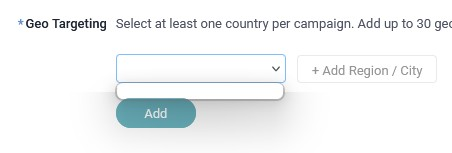
I'm trying to access a dropdown menu on trafficjunky.com but the menu is not functioning correctly and will not load. When I select the dropdown, it opens a small blank white box that should fill with options, and I should have the ability to free type as well so I can search for a location. This does not happen, the only thing that happens is what you can see in the picture and free type is not functioning.
I have cleared cookies and cache numerous times, updated my browser, deactivated extensions, turned off performance settings, and have tried both troubleshooting and incognito modes as well. I am not running ad blockers or themes on Firefox.
Any advice you can provide is appreciated!
Thank you, Kyle
Hello,
I'm trying to access a dropdown menu on trafficjunky.com but the menu is not functioning correctly and will not load. When I select the dropdown, it opens a small blank white box that should fill with options, and I should have the ability to free type as well so I can search for a location. This does not happen, the only thing that happens is what you can see in the picture and free type is not functioning.
I have cleared cookies and cache numerous times, updated my browser, deactivated extensions, turned off performance settings, and have tried both troubleshooting and incognito modes as well. I am not running ad blockers or themes on Firefox.
Any advice you can provide is appreciated!
Thank you,
Kyle