


Windows 10 reached EOS (end of support) on October 14, 2025. For more information, see this article.

搜尋 Mozilla 技術支援網站

防止技術支援詐騙。我們絕對不會要求您撥打電話或發送簡訊,或是提供個人資訊。請用「回報濫用」功能回報可疑的行為。

了解更多

New Version Ruined Privacy Option

  • 2 回覆
  • 0 有這個問題
  • 41 次檢視
  • 最近回覆由 Anan

更多選項

The most recent Firefox update (145.0) lacks the convenience of easily editing the cookie collection that tells websites about me. The feature I'm referring to was under settings - privacy and security - and then something about cookies. It allowed me to show what sites had collected cookies on me recently and to erase any private data they had collected.

I hope this was an oversight or the feature has simply been moved to another location. If not, I'd really like to roll back the latest update and pause any further updates until the old functionality is restored to the new updates.

Can anybody help me?

The most recent Firefox update (145.0) lacks the convenience of easily editing the cookie collection that tells websites about me. The feature I'm referring to was under settings - privacy and security - and then something about cookies. It allowed me to show what sites had collected cookies on me recently and to erase any private data they had collected. I hope this was an oversight or the feature has simply been moved to another location. If not, I'd really like to roll back the latest update and pause any further updates until the old functionality is restored to the new updates. Can anybody help me?

被選擇的解決方法

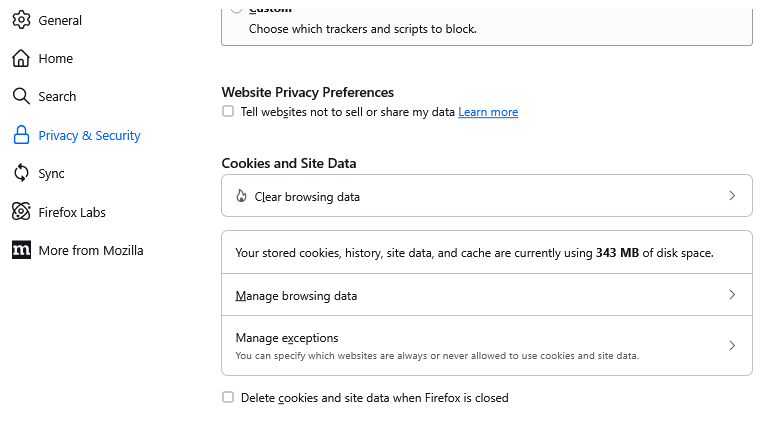
I know the Manage Data... button well. It looks like the buttons in that section changed shape and possibly sequence, but the names are similar:

  • Clear Data... => Clear Browsing Data
  • Manage Data... => Manage Browsing Data
  • Manage Exceptions... => Manage exceptions

Are you not seeing those buttons?
從原來的回覆中察看解決方案 👍 1

所有回覆 (2)

更多選項

選擇的解決方法

I know the Manage Data... button well. It looks like the buttons in that section changed shape and possibly sequence, but the names are similar:

  • Clear Data... => Clear Browsing Data
  • Manage Data... => Manage Browsing Data
  • Manage Exceptions... => Manage exceptions

Are you not seeing those buttons?

問個問題

如果您還沒有帳號,您必須先登入帳號 來回覆文章。還沒有帳號的話,只能發問新問題