


Missing profile but Firefox still works

I have Firefox installed on a Windows 11 desktop. The profile is missing, yet Firefox is working fine, and I see all of my bookmarks, etc.
I have windows set to show hidden files.
When I try to run %APPDATA%\Mozilla\Firefox\Profiles\ it tells me that the location is unavailable.
I cannot find the profile anywhere in file explorer, despite multiple tries to search for it.
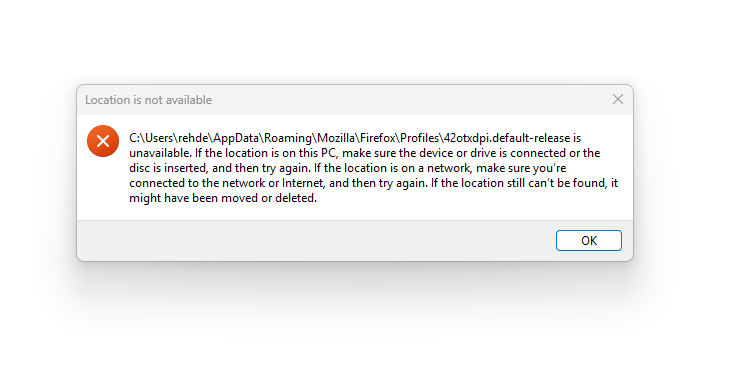
If I go to Help > Troubleshooting Information, I see a "Location is not available" message, shown in the attached image.
I could uninstall and reinstall Firefox, but I'd prefer to solve this because the exact same thing is happening to my Thunderbird profile. It doesn't exist anywhere, yet I can see all of my emails and it appears to be working properly. I only found this problem because I wanted to backup my emails but was unable to.
Both of these profiles must exist somewhere, but I've tried everything to find them. Please help me fix this in Firefox, and then if I have a fix here I'll try to apply it to Thunderbird, where I have a lot of emails I'd hate to lose.
所有回覆 (4)
選擇的解決方法
Sorry, this is a quirk/bug of the version of Firefox from the Microsoft store (also known as MSIX). That version uses a deeply buried folder which is not accurately listed on the Troubleshooting Information page.
In the following article, could you do a Ctrl+F (Find in page) for MSIX for steps to get the true location:
Profiles - Where Firefox stores your bookmarks, passwords and other user data
Success?
OMG thank you so much! This worked! I also found my Thunderbird profile in the same location.
Now that I know where it is, and can back everything up, should I leave it alone, or would it be better to uninstall this version and reinstall a different version without the quirk?
I appreciate your help!
Hello,
I am glad to hear that your problem has been resolved. If you haven't already, please select the answer that solves the problem. This will help other users with similar problems find the solution.
Thank you for contacting Mozilla Support.
sarehder said
Now that I know where it is, and can back everything up, should I leave it alone, or would it be better to uninstall this version and reinstall a different version without the quirk?
I'm not completely confident about migrating the data. As long as you can back it up, it might not be worth the effort?