


How to disable firefox from suggesting emails/passport numbers/phone numbers when you are typing in details?

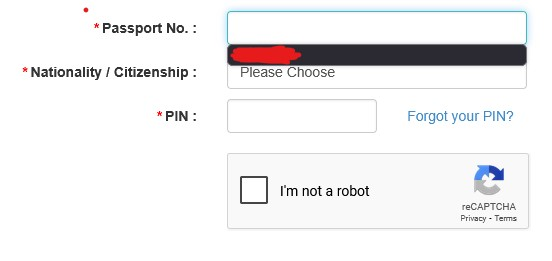
See the image below, how do I prevent that black box showing up and showing anyone who uses my device my sensitive data? How is this not a common setting to be changed?
Very insecure and Horrible to have on by default. Recently switched to firefox from chrome because of security concerns but stuff like this is making me want to go back, because HOW IS THIS SAFE AND SECURE?!?!?!?
I've typed in passwords in boxes that arent really password boxes, and firefox has suggested my own password in plain sight like in the image below.
Strongly recommend firefox to not make this default and make it an accessible setting to disable because I've leaked my sensitive information to online calls because of this. This urgently needs to be addressed as a security concern. At least have a cogwheel button next to the black box to quickly disable this setting. Very very disappointed.
所有回覆 (2)
Found the setting to disable but the setting is hidden under a dropdown and not intuitive AT ALL. Massive security issue. Only stuck with firefox because google hates adblockers. Anyone got a chrome clone that likes adblockers?
I assume it was the setting in this article: Control whether Firefox automatically fills in forms. I disable it myself.
If you have a little free time, Mozilla has a product suggestion site at https://connect.mozilla.org/. You can post this request there to get into the current feedback stream. Use the "Ideas" section of the site (at https://connect.mozilla.org/t5/ideas/idb-p/ideas).