Recovery key
Hello I have just installed Firefox on a new machine and was wondering how I can activate the recovery key?
Hello
I have just installed Firefox on a new machine and was wondering how I can activate the recovery key?
所有回覆 (1)
Hello,
Recovery keys may be used to keep encrypted data like bookmarks, history and passwords when resetting your Mozilla account password.
What to you mean by "activate the recovery key"? To generate and store your account recovery key:
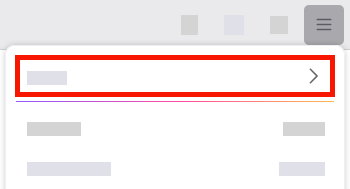
- Click the menu button
 to open the menu panel.
- Click your Mozilla account name at the top (or sign in if you're not already).
-
- Click "Manage account".
- The Mozilla account page will open in a new tab.
- Under Security, next to Account recovery key, click Create.
- On the on onboarding prompt, click Get started.
- Enter your password and then click Create account recovery key.
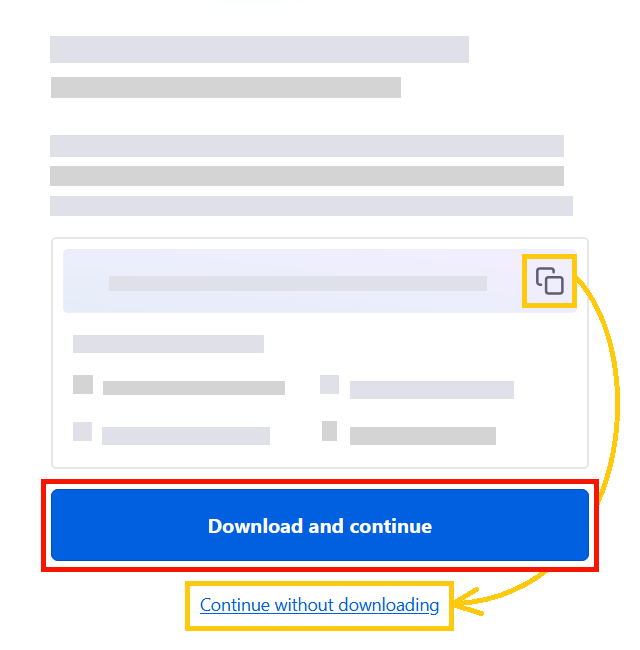
- Your account recovery key has been created! Click Download and continue to download a file with it.
- You can also copy your key and then click Continue without downloading. In that case, make sure to save it manually.
- Store your account recovery key in a safe location where you won't lose it.
-
- Optionally, enter a hint to make it easier for you to remember where you stored your key. The hint will be shown during the password reset.
- Click Finish.