Some tabs are unreachable when switching between them using Ctrl+tab
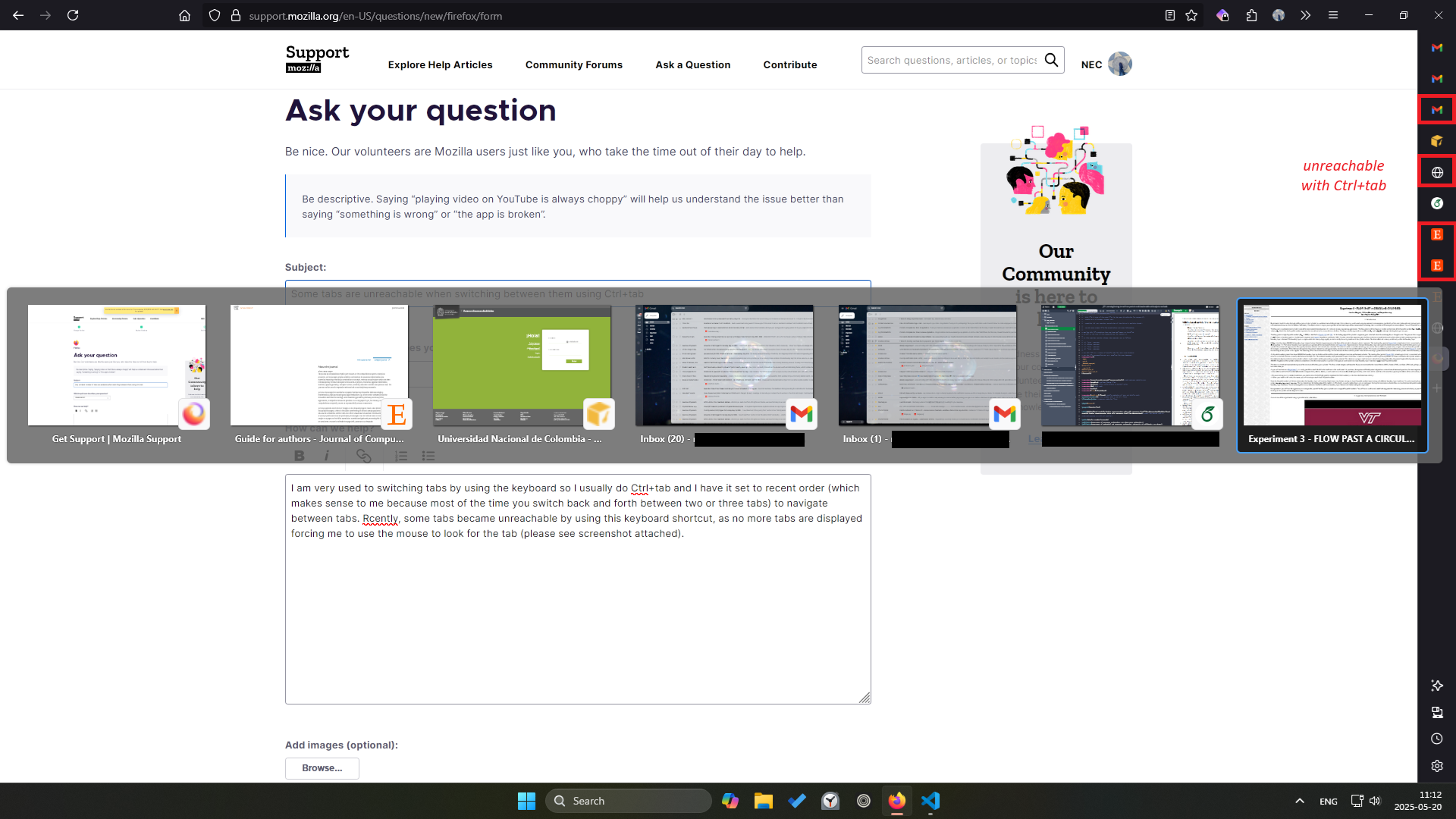
I am very used to switching tabs by using the keyboard so I usually do Ctrl+tab and I have it set to recent order (which makes sense to me because most of the time you switch back and forth between two or three tabs) to navigate between tabs. In some recent update, some tabs became unreachable by using this keyboard shortcut, as no more tabs are displayed nor do they appear when you reach the end of the list, forcing me to use the mouse to look for the tab (please see screenshot attached).
I was hoping this had a workaround or if it is a bug I would like to know how to report it.
Thank you!
Nicolas
I am very used to switching tabs by using the keyboard so I usually do Ctrl+tab and I have it set to recent order (which makes sense to me because most of the time you switch back and forth between two or three tabs) to navigate between tabs. In some recent update, some tabs became unreachable by using this keyboard shortcut, as no more tabs are displayed nor do they appear when you reach the end of the list, forcing me to use the mouse to look for the tab (please see screenshot attached).
I was hoping this had a workaround or if it is a bug I would like to know how to report it.
Thank you!
Nicolas
所有回覆 (1)
Sorry, here is the screenshot.