


Jump down more than 1 findbar hit (e.g. 10 hits down)
I realize that the page I am using findbar to search from reloads and scrolls to the top using some Javascript so that when I return to the searched page from a popup, the last search item is no longer focused when I come back so (or press F3 or Ctrl G) e.g. if I found the 29th hit, then I have to click down 30 times to get to the next search hit.
I tried using add-in Luminous to disable the reload/scroll to top of the page that I am searching but failed. It is a complicated add-in.
Is there any way to jump say 10 hits down at once?
被選擇的解決方法
I tried some JavaScript in the Browser Console to see if I can come up with something, but is seems to be rather difficult. I need to toggle "Highlight All" to make this work properly (i.e. make Firefox show the highlight), so use at your own risk.
/* go to Find bar result */
var E=document.querySelector('.findbar-label.found-matches:not([hidden])');
try{
var D=JSON.parse(E.dataset.l10nArgs);
var C=D.current;
var T=D.total;
var L=D.limit;
var S=D.searchString;
var G=prompt('Search: "'+S+'"\nCurrent: '+C+'\nTotal: '+T,C);
if(G<1){G=1}
if(G>T){G=T}
if(G>=1 && G<=T){
console.log('searchString:"',S,'"Current:',C,'Total:',T,'Limit:',L,'Go:',G);
if(C<G){for(var i=C;i<G;i++){E.parentNode.querySelector('.findbar-find-next').click()}}
if(C>G){for(var i=C;i>G;i--){E.parentNode.querySelector('.findbar-find-previous').click()}}
}
setTimeout(function(){
var E=document.querySelector('.findbar-label.found-matches:not([hidden])');
var D=JSON.parse(E.dataset.l10nArgs);
console.log('Current:',D.current);
},1000);
}catch(e){alert(e)}
從原來的回覆中察看解決方案 👍 1
所有回覆 (10)
I created this authotkey script which sends shift Ctrl G ten times when I press F4
F4:: { Send ^+G Send ^+G Send ^+G Send ^+G Send ^+G Send ^+G Send ^+G Send ^+G Send ^+G Send ^+G }
But the strange thing is that the Sending just ^G which should be Ctrl G goes up as well. Likewise Send +^G I can jump up 10 at a time.

Beyond the standard HotKeys for the Browser anything that changes or mods keystrokes would be up to 3rd party software to do or userChrome.css sites to make those changes.
選擇的解決方法
I tried some JavaScript in the Browser Console to see if I can come up with something, but is seems to be rather difficult. I need to toggle "Highlight All" to make this work properly (i.e. make Firefox show the highlight), so use at your own risk.
/* go to Find bar result */
var E=document.querySelector('.findbar-label.found-matches:not([hidden])');
try{
var D=JSON.parse(E.dataset.l10nArgs);
var C=D.current;
var T=D.total;
var L=D.limit;
var S=D.searchString;
var G=prompt('Search: "'+S+'"\nCurrent: '+C+'\nTotal: '+T,C);
if(G<1){G=1}
if(G>T){G=T}
if(G>=1 && G<=T){
console.log('searchString:"',S,'"Current:',C,'Total:',T,'Limit:',L,'Go:',G);
if(C<G){for(var i=C;i<G;i++){E.parentNode.querySelector('.findbar-find-next').click()}}
if(C>G){for(var i=C;i>G;i--){E.parentNode.querySelector('.findbar-find-previous').click()}}
}
setTimeout(function(){
var E=document.querySelector('.findbar-label.found-matches:not([hidden])');
var D=JSON.parse(E.dataset.l10nArgs);
console.log('Current:',D.current);
},1000);
}catch(e){alert(e)}
由 cor-el 於 修改
I've made a few changes to the above posted code, so make sure you use the latest version.
Cor-el
Thank you very much indeed!
I think that my Autohotkey script will jump backwards (though it also turns off the count so I am not quite sure) so all I need is jump forwards.
But your console code is too difficult for me to understand.
I changed about:config devtools.chrome.enabled to true, pressed Shift Ctrl J pasted the above code into the funnel icon single line bar at the top of the console pressed Shift Enter, and nothing happened.
I think I would need it to be triggered by a key.
Should you be so kind as to help more I would be very grateful.
Tim
Shift + enter only adds a line break. You need to press Enter or use the special editor (click the icon at the far right on the command line).
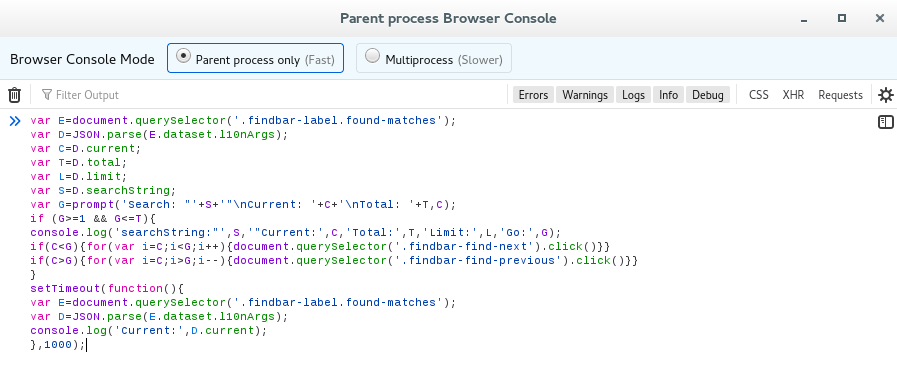
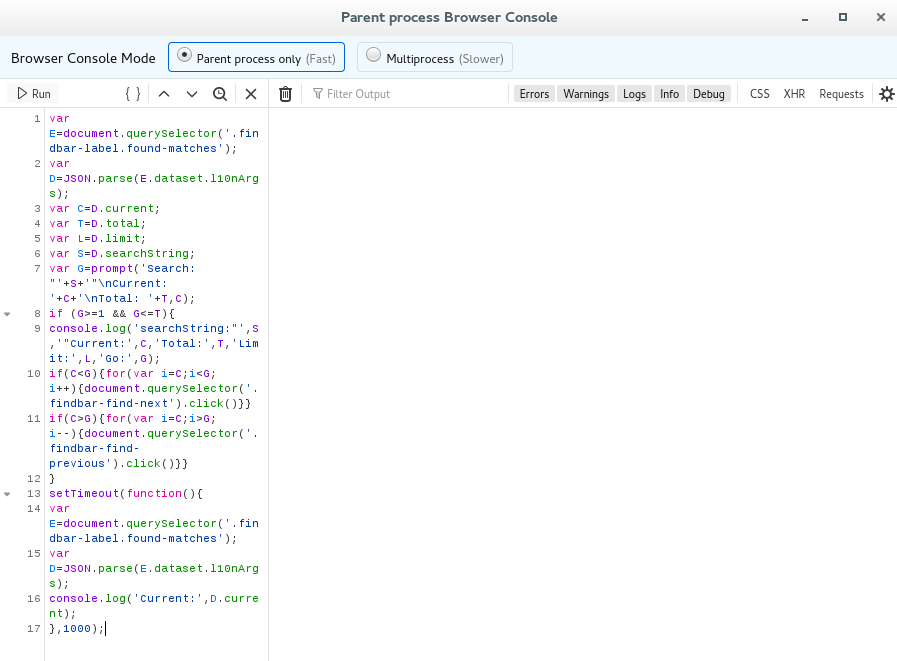
由 cor-el 於 修改
Looks like it is even more complicated than I thought as there can be more (hidden) findbar-containers. Hopefully this new code does work.
由 cor-el 於 修改
Thanks again Corel
Alas i am not getting this to work, in my stupidity. A dialogue popped up telling me I was on search item number 2 but the focus did not jump.
I am just using my mouse and or the autohotkey when I have a lot of clicking to do. I have moved the findbar to above the main window with some CSS to userchrome from this forum which helps.
由 Timtak 於 修改
I did some final edits and the current code works in more cases. You can toggle a setting "Highlight All" to force a repaint of the find bar if the results go missing. If necessary close and reopen the Browser Console as tab or window changes can cause issues.
I ended up using my Autohotkey Script and just jumped up to the top from the bottom if need be but thank you very much indeed to Cor-el for the javascript, which I will mark as solving the problem for those who know how to use the console.
Thanks again, Tim