


Windows 10 reached EOS (end of support) on October 14, 2025. If you are on Windows 10, see this article.

搜尋 Mozilla 技術支援網站

防止技術支援詐騙。我們絕對不會要求您撥打電話或發送簡訊,或是提供個人資訊。請用「回報濫用」功能回報可疑的行為。

了解更多
Solved 封存

Cannot connect to local websites with Firefox

hotspor00

Hi

I have this issue where I cannot connect to any local website like 192.168.1.1 ( my router ) or any other site like that. This is the case for the for fresh installed Firefox, Chrome and Chromium browser. For Edge browser everything works fine!

Pinging from CMD goes fine to local and open internet. DNS solving works also.

Chrome gives error code: ERR_NETWORK_ACCESS_DENIED Firefox: Unable to connect

I'm using Windows 11.

I tried: - Disable all Firewalls in Windows 11 - Disable Windows build in virus protection - Tried DHCP and static IP - Tried 8.8.8.8 and 1.1.1.1 DNS - Latest Windows 11 Update

Windows 11 Ethernet settings Link speed (Receive/Transmit): 1000/1000 (Mbps) IPv4 address: 192.168.1.150 IPv4 DNS servers: 8.8.8.8 (Unencrypted) Manufacturer: Rivet Networks Description: Killer E2500 Gigabit Ethernet Controller Driver version: 9.0.0.42 Physical address (MAC): 30-9C-23-8B-3B-F2

I highly suspect that this is something Windows 11 related.
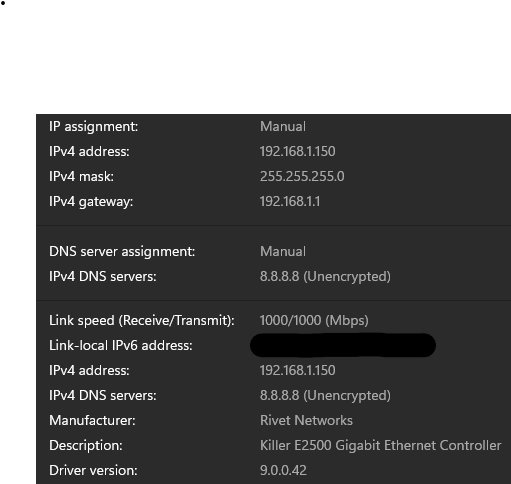
Hi I have this issue where I cannot connect to any local website like 192.168.1.1 ( my router ) or any other site like that. This is the case for the for fresh installed Firefox, Chrome and Chromium browser. For Edge browser everything works fine! Pinging from CMD goes fine to local and open internet. DNS solving works also. Chrome gives error code: ERR_NETWORK_ACCESS_DENIED Firefox: Unable to connect I'm using Windows 11. I tried: - Disable all Firewalls in Windows 11 - Disable Windows build in virus protection - Tried DHCP and static IP - Tried 8.8.8.8 and 1.1.1.1 DNS - Latest Windows 11 Update Windows 11 Ethernet settings Link speed (Receive/Transmit): 1000/1000 (Mbps) IPv4 address: 192.168.1.150 IPv4 DNS servers: 8.8.8.8 (Unencrypted) Manufacturer: Rivet Networks Description: Killer E2500 Gigabit Ethernet Controller Driver version: 9.0.0.42 Physical address (MAC): 30-9C-23-8B-3B-F2 I highly suspect that this is something Windows 11 related.
附加的畫面擷圖

所有回覆 (1)

選擇的解決方法

Reset network setting from Windows 11 Network & internet > Ethernet did the thing. Commenting if somebody wants to get this issue solved.