

此討論串已經關閉並封存。
如果您有需要幫助,請新增一個新問題

Locked
封存
How to enable Total Cookie Protection when in Custom mode?

In the Total Cookie Protection (TCP) article (https://blog.mozilla.org/security/2021/02/23/total-cookie-protection/) it says TCP is in Strict mode. I have my settings set to Custom with All third party cookies blocked, trackers blocked in all windows, cryptominers blocked, fingerprinters blocked. With these custom settings is TCP enabled for me? If not how do I enable it? Thanks in advance.
In the Total Cookie Protection (TCP) article (https://blog.mozilla.org/security/2021/02/23/total-cookie-protection/) it says TCP is in Strict mode. I have my settings set to Custom with All third party cookies blocked, trackers blocked in all windows, cryptominers blocked, fingerprinters blocked. With these custom settings is TCP enabled for me? If not how do I enable it? Thanks in advance.
所有回覆 (1)
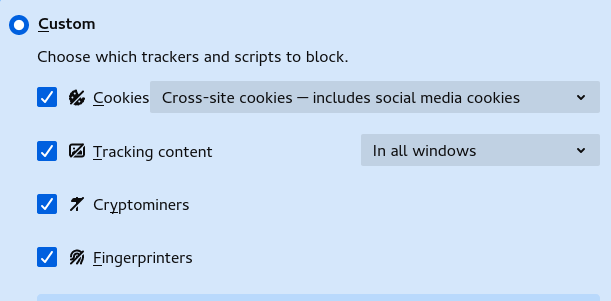
That would be this setting for the Cookies.
- Cross-site cookies — includes social media cookies
This question has been locked because the original author has deleted their account. While you can no longer post new replies, the existing content remains available for reference.