此討論串已被封存。
如果您有需要幫助,請新增一個新問題

已解決
封存
I lost the bookmark star button from next to the address bar.
Similar to https://support.mozilla.org/en-US/questions/1173871. I accidentally clicked on remove this from address bar (thinking that would remove the bookmark).
I ran into https://support.mozilla.org/en-US/questions/1173871 with no solution but finally figured out how to add it back. But that thread was archived and closed. So I could not respond with a answer. Opening a new thread with to post the answer. Hoping that it will help others like myself who ran into this issue.
Similar to https://support.mozilla.org/en-US/questions/1173871. I accidentally clicked on remove this from address bar (thinking that would remove the bookmark).
I ran into https://support.mozilla.org/en-US/questions/1173871 with no solution but finally figured out how to add it back. But that thread was archived and closed. So I could not respond with a answer. Opening a new thread with to post the answer. Hoping that it will help others like myself who ran into this issue.
所有回覆 (1)
選擇的解決方法
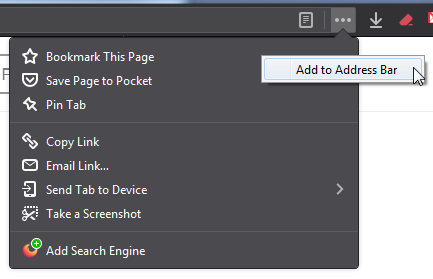
To restore the bookmarks star button in the address bar:
- Left-click on the three little dots ... in the address bar.
- Right-click on Bookmark This Page.
- Left-click on Add to Address Bar.
See the attached image for better understanding.