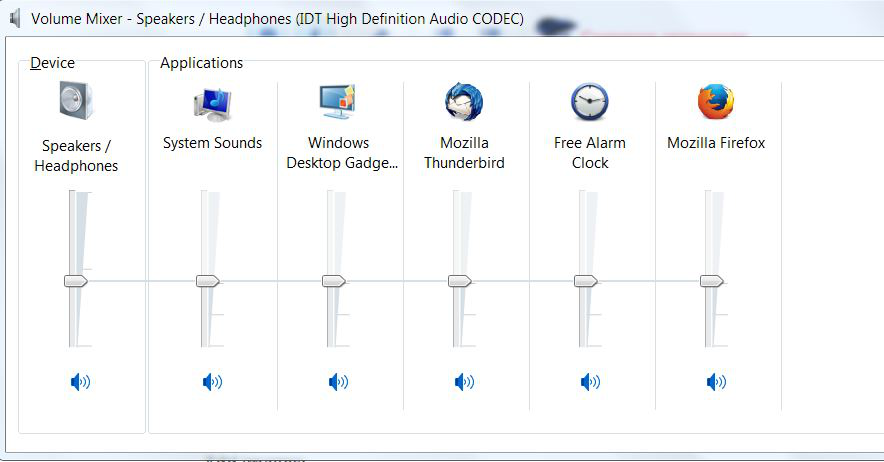
Playing YouTube videos- the sound isn't as loud as it should be. It's louder with other browsers.

Sound plays OK, but not loud enough. Sounds is louder with other browsers and is fine with all other programs. I have cheap Dell speakers, but they are plenty loud otherwise- just on YouTube. I have a high end Dell which otherwise is working fine.
所有回覆 (4)
So how do you determine loud?
Zorzo said
Sound plays OK, but not loud enough. Sounds is louder with other browsers and is fine with all other programs. I have cheap Dell speakers, but they are plenty loud otherwise- just on YouTube. I have a high end Dell which otherwise is working fine.
Check the volume slider on the videos.
It's like this- I have the same video on both YouTube and Vimeo. If I play on Firefox- then on my MS Explorer browser- it's much louder on the Explorer- if the volume is set to the maximum in both cases. Any and all other sounds from all other programs will player normal, that is, as loud as I like. So, it seems like the problem is a combination of YouTube videos played on Firefox. If I go to any other web site with Firefox, the sound is normal. So, again, it's an odd combination of YouTube and Firefox, and no other combination of browser and web sites. Strange. Not a big deal. I just use my headphones and then it's a loud as I want. I try to not use Explorer because it's no longer supported on W8 which I'm using (I think). Though the speakers are low end Dell- they are plenty loud in all other cases. I can almost always figure out computer problems but this one has me stumped.

Open the Computers Volume Mixer fully and check the settings.