


I can't delete separators in my bookmarks menu

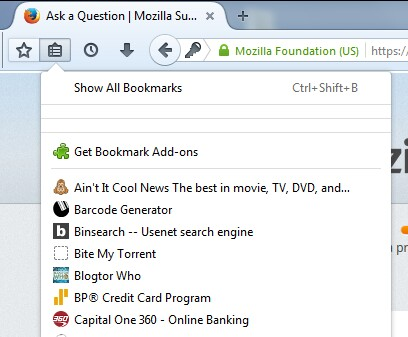
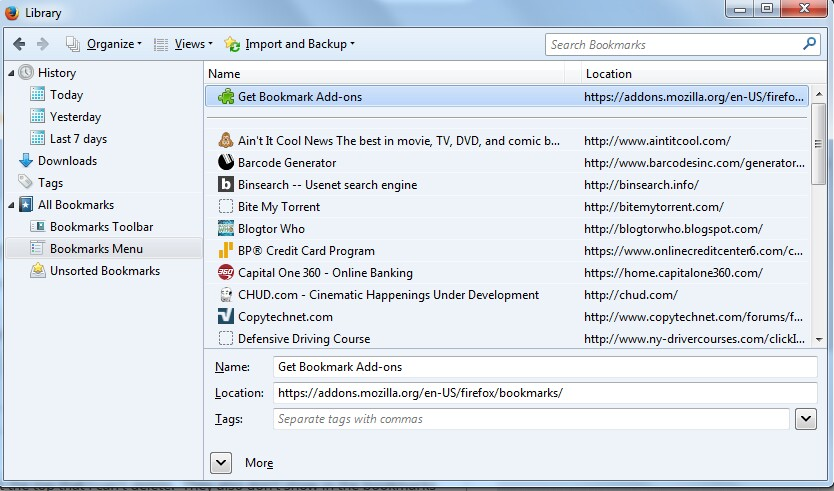
In my bookmarks drop-down menu, I have several separators at the top that I can't delete. They also don't show in the bookmarks library, so I can't remove them that way.
In my bookmarks drop-down menu, I have several separators at the top that I can't delete. They also don't show in the bookmarks library, so I can't remove them that way.
所有回覆 (3)
Screencaps of the drop-down menu & bookmarks library.

To open the Bookmarks Manager, press the Alt or F10 key bring up the tool bar, and select Bookmarks. Hot key is <Control>(Mac:<Command>) <Shift> B.
Does it work from here?
Some separators are there by default and contain default items.
Are you using Sync?
Start Firefox in Safe Mode to check if one of the extensions (Firefox/Tools > Add-ons > Extensions) or if hardware acceleration is causing the problem.
- Switch to the DEFAULT theme: Firefox/Tools > Add-ons > Appearance
- Do NOT click the Reset button on the Safe Mode start window