


Using Firefox 32 a few websites (such as Speedtest.net) show the activity icon and never finish loading, but load without problem using 2 other browsers

This is the only evident problem - no pop-ups or redirected searches etc. I have read and followed the advice in https://support.mozilla.org/en-US/kb/firefox-cant-load-websites-other-browsers-can
and then checked: For malware using Malwarebytes and MSE (full scans) Turned off Malwarebytes and MSE Cleared and reinstated Windows firewall entry for Firefox Firefox connection settings - no proxy Set network.dns.disableIPv6 to true Set network.dns.disablePrefetch to true Cleared cookies and cache Reset Firefox Uninstalled and reinstalled Firefox
The problem remains - grateful for any advice.
所有回覆 (3)
選擇的解決方法
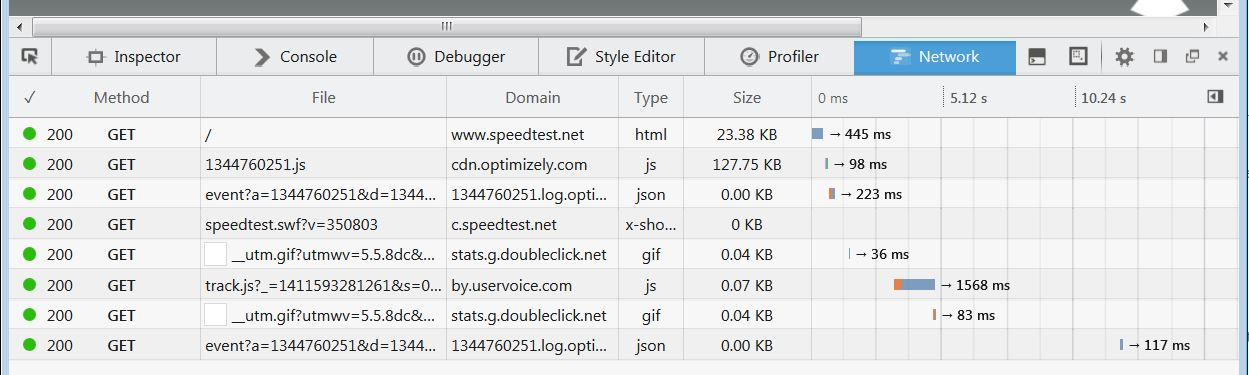
Where is is hanging if you check that in the Web Console (Firefox/Tools > Web Developer) on the Network tab?
You can reload web page(s) and bypass the cache to refresh possibly outdated or corrupted files.
- Hold down the Shift key and left-click the Reload button
- Press "Ctrl + F5" or press "Ctrl + Shift + R" (Windows,Linux)
- Press "Command + Shift + R" (Mac)
Many thanks for the response.
I tried Web Developer/Network and the result was as attached.
Problem now resolved.