


signed up for sync but put the wrong email address, how do i correct?

Put in wrong email address when trying to get into sync program. How do I get this corrected?
所有回覆 (2)

Hi conny1,
This happened to me a while back and here's how I fixed it:
- Click on the menu button The image "new fx menu" does not exist., then "Options"
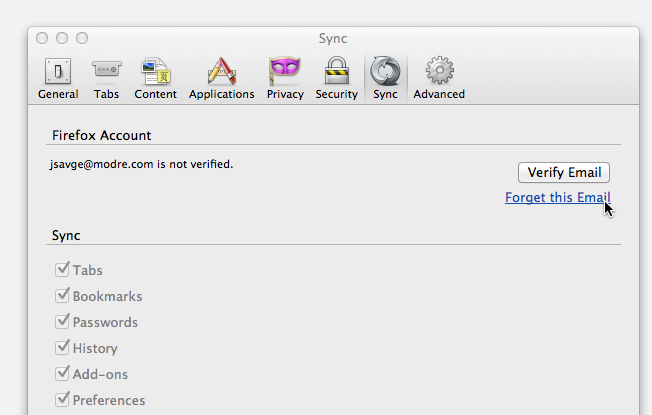
- Click the "Sync" tab on the window that opens.
- You should see a message on that panel saying your email address isn't verified. Click on "Forget this email" (see attached screenshot).
The Sync login page will open in a new tab. You'll be able to sign up for a new account from there.
I hope that helps. Please let us know if that fixed the issue.
Joni
Hi conny, Thank you for your question, currently it is not possible to change the email address of an account that has been set up.
Make a back up of your profile and remove the account from each of the devices. From Firefox.accounts.mozilla.com, login and click delete account.
Then go through the set up one more time. How do I set up Sync on my computer?
If you have any other questions we are happy to help.