


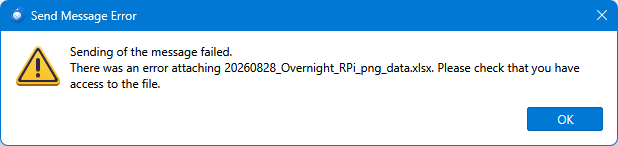
sending of the message failed. there was an error attaching file. please check that you have access to the file

I have an issue when trying to forward an email that contains an attachment. I receive the following error message:
"Sending of the message failed. There was an error attaching the file. Please check that you have access to the file."
I am using Thunderbird version 152 on Windows 10 Pro.
This issue only occurs when forwarding emails with attachments. Other email functions appear to work normally. Has anyone else encountered this issue? I would appreciate any help or suggestions. Thank you in advance.
All Replies (3)

You're seeing a bug that has been mentioned here recently. I'm looking at Bugzilla to see if it's been officially reported. I don't see it yet, but I'm still looking.
https://bugzilla.mozilla.org/describecomponents.cgi?product=Thunderbird
Version 152.01 is out now. I don't know if that bug is fixed there but I'll test it later.
(later edit...)
The bug appears to NOT be fixed in 152.01 .
What I see happening is that when you create a Forward message that has attachments, copies of the original attachment are placed in Windows' %TEMP% folder. When you eventually send the message, those temporary copies of the attachments are attached to the message and they're on their way. And that's what happens if you create the message and send it within a minute or two. However, after some several minutes, the attachment copies disappear from the TEMP folder; if you try to send your message after that time, the attachments can't be found and you get that error message. This is obviously wrong behavior.
Ti ṣàtúnṣe nípa Lin
I'm running 154.0 (64-bit). I've run into this also, though it seems if I close Excel when attaching a spreadsheet I do not see the problem. That is, if I remember to do it before sending. Today, I didn't.
What I am a little disturbed by, is that I can not find what happened to the message (which I had put some effort into writing). I checked Sent and Drafts without joy. I just repeated the process sending the attachment to myself. It never arrived, nor do I see any indication that it was send.
Seems to me it's more than a nuisance if emails disappear.
Bob
R A D said
I'm running 154.0 (64-bit). I've run into this also, though it seems if I close Excel when attaching a spreadsheet I do not see the problem. That is, if I remember to do it before sending. Today, I didn't. What I am a little disturbed by, is that I can not find what happened to the message (which I had put some effort into writing). I checked Sent and Drafts without joy. I just repeated the process sending the attachment to myself. It never arrived, nor do I see any indication that it was send. Seems to me it's more than a nuisance if emails disappear. Bob
It would be best if you started a new thread about this issue so it doesn't get mixed up with the previous one, which appears to be resolved.
I will say this - I don't think yours is the same problem. That one had to do with forwarding messages, the process of which involved Thunderbird creating a copy of the attachment in the TEMP folder, and then mysteriously deleting it before the message was sent. That no longer seems to be happening.
In your case, you're attaching an XLSX file directly to a new message. This doesn't involve any temporary files (unless possibly if you have saved it as a draft and are working on it later) and the attached file does not disappear.
Yes, this is bad behavior - there should never be data loss - but I think something else is going on. Possibly involving your anti-virus or Excel itself locking the file.