


Firefox crashes

When I try to load firefox the crash reporter keeps popping up, I have submitted the problem and my email address from the report. I have tried to reinstall firefox and the same thing happens. There are no viruses on the computer and I have tried to follow the steps suggested. I cannot start in safe mode either. See screen shots images.
All Replies (3)

Start Firefox in Safe Mode {web Link} by holding down the <Shift>
(Mac Options) key, and then starting Firefox. Is the problem still there?
While still in Safe Mode,
In the address bar, type about:crashes<enter>. Note: If any reports do not have BP in front of the numbers/letters, click it and select Submit.
The crash report is several pages of data. We need the report numbers to see the whole report.
Using your mouse, mark the most resent 7 - 10 crash reports, and copy them. Now go to the reply box below and paste them in.
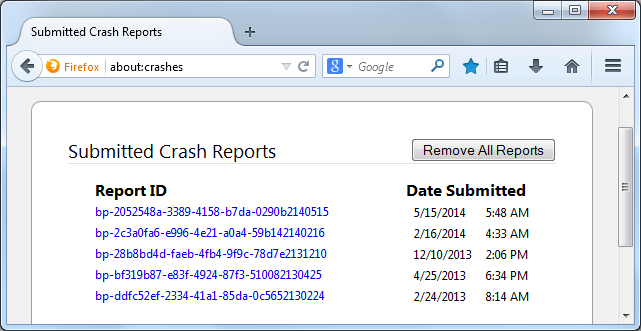
If you can't get Firefox to open, you will have to do this the hard way. https://support.mozilla.org/en-US/kb/mozillacrashreporter Open the file browser / explorer on your computer. Note: You may have to enable Show Hidden Folders / Files. Enter this in the address bar;
Windows: %APPDATA%\Mozilla\Firefox\Crash Reports\submitted Win 7/Vista: C:\Users\<username>\AppData\Roaming\Mozilla\Firefox\Crash Reports\submitted Win XP/2000: C:\Documents and Settings\<username>\Application Data\Mozilla\Firefox\Crash Reports\submitted
Mac OS: /Users/<username>/Library/Application Support/Firefox/Crash Reports/submitted Linux: /home/<username>/.mozilla/firefox/Crash Reports/submitted
Copy the last 5-7 Recent File Names in the folder. Post the information in the reply box below.
I cannot paste into this box, it doesn't let me I have all the crash reports that I can email, I cannot attach either it just wont load the attachment.
I cannot start in safe mode either.
Start your Computer in safe mode with networking. Then start Firefox. Can you do the crash reports now?