


Windows 10 reached EOS (end of support) on October 14, 2025. If you are on Windows 10, see this article.

Tìm kiếm hỗ trợ

Tránh các lừa đảo về hỗ trợ. Chúng tôi sẽ không bao giờ yêu cầu bạn gọi hoặc nhắn tin đến số điện thoại hoặc chia sẻ thông tin cá nhân. Vui lòng báo cáo hoạt động đáng ngờ bằng cách sử dụng tùy chọn "Báo cáo lạm dụng".

Tìm hiểu thêm
Đã giải quyết Đã lưu trữ

[SOLVED] Cannot grab tabs from other devices

soulfox đã trả lời
soulfox

Using Firefox View, I am unable to view my tabs from other devices after setting up Sync. It is saying Check your internet connection. If you’re using a firewall or proxy, check that Firefox has permission to access the web. as if I don't have a correctly configured connection. However I indeed do and am able to browse the web without any issues. I should mention that I'm running the latest stable flatpak and I'm wondering if this could be related but I have no idea how to manipulate the flatpak to make this work.
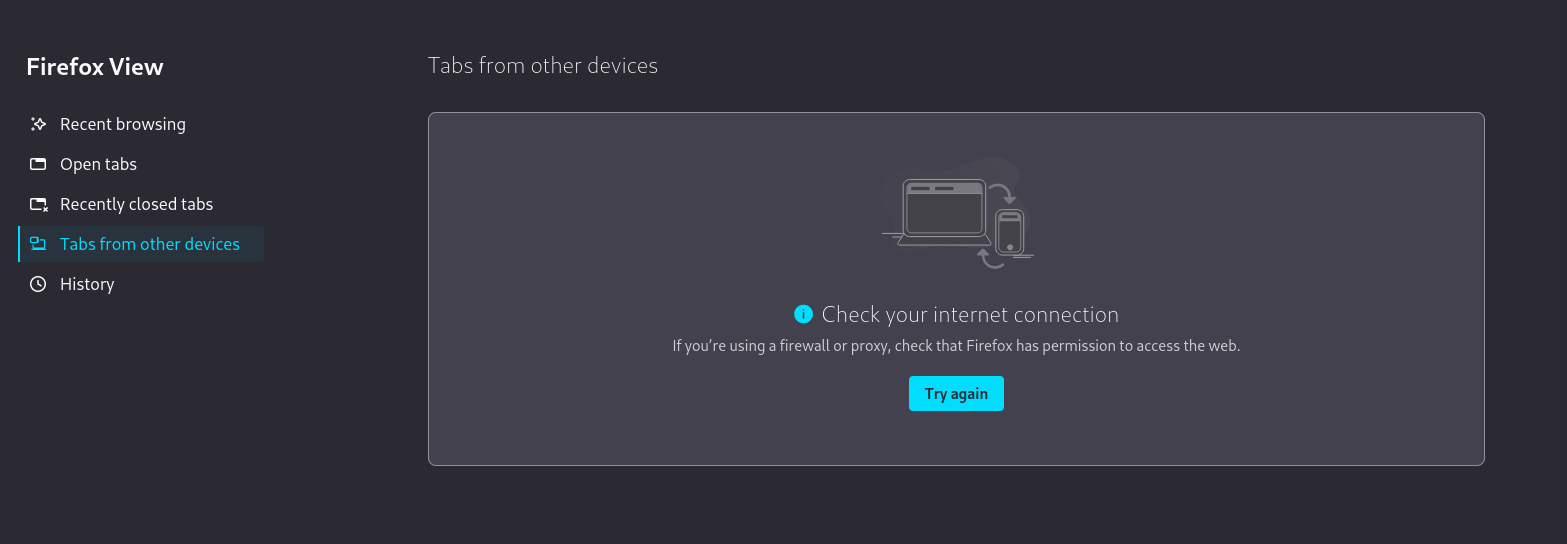
Using Firefox View, I am unable to view my tabs from other devices after setting up Sync. It is saying ''Check your internet connection. If you’re using a firewall or proxy, check that Firefox has permission to access the web.'' as if I don't have a correctly configured connection. However I indeed do and am able to browse the web without any issues. I should mention that I'm running the latest stable flatpak and I'm wondering if this could be related but I have no idea how to manipulate the flatpak to make this work.
Đính kèm ảnh chụp màn hình

Được chỉnh sửa bởi soulfox vào

Tất cả các câu trả lời (7)

It's also worth noting that I can view my tabs from this device on my other synced devices but not vice versa. So it is properly syncing but can't get tabs from my other devices.
Giải pháp được chọn

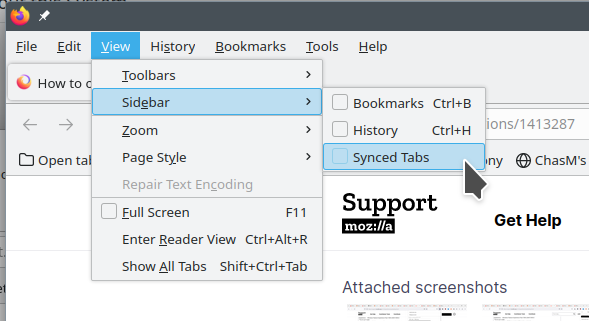
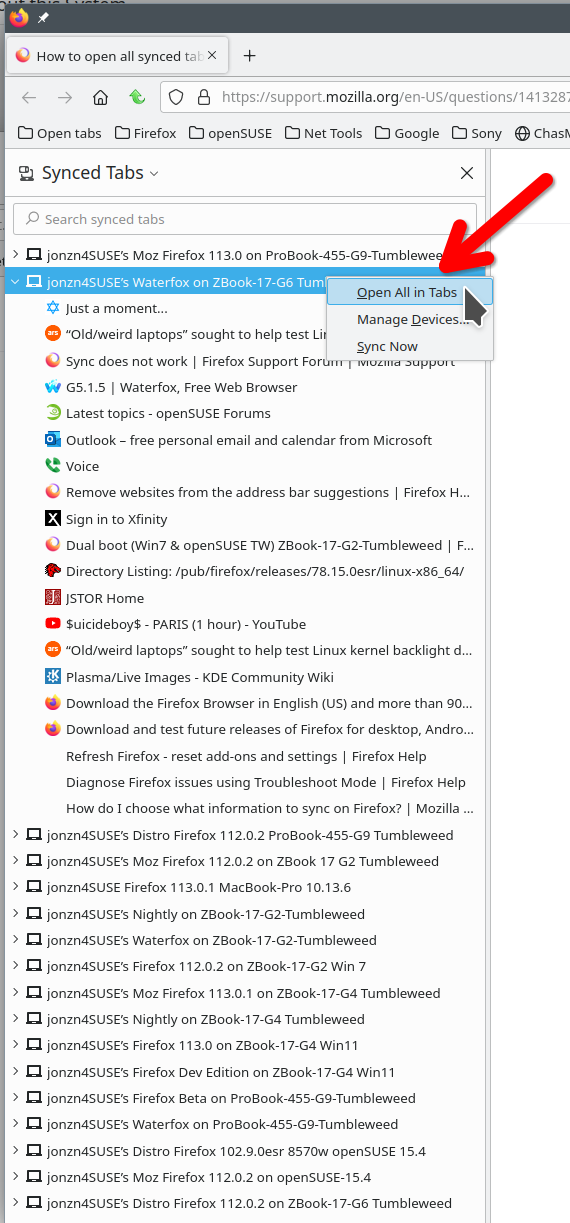
Just do it this way. see screenshot

jonzn4SUSE said

Just do it this way. see screenshot

I have no fricking idea why that worked but it did! Thanks! You can get there even faster with Ctrl+B and then switching to Synced Tabs from there.

This workaround works, but is it known why synced tabs are not displayed in Firefox View, and only there?

iDesmI said

This workaround works, but is it known why synced tabs are not displayed in Firefox View, and only there?

It must have to do with how flatpaks are installed and sandboxed away from the system, thus confusing Firefox as to where to find this data. That's pure speculation though, very valid question - I'm curious as well.

Since Mozilla ships an official deb package now, it's not a big deal on Debian at least. Given the option, I would recommend never using the flatpak, just because a lot of functionality breaks when sandboxed in this way. On the Steamdeck, unfortunately that's the only option, however that's the only device where I still use it.

soulfox said

Since Mozilla ships an official deb package now, it's not a big deal on Debian at least. Given the option, I would recommend never using the flatpak, just because a lot of functionality breaks when sandboxed in this way. On the Steamdeck, unfortunately that's the only option, however that's the only device where I still use it.

The flatpak is also officially packaged by Mozilla. Every non Debian-based distro was encouraged to switch, too.

iDesmI said

The flatpak is also officially packaged by Mozilla. Every non Debian-based distro was encouraged to switch, too.

</blockquote>

Oh you're absolutely right, it is. I'm just saying flatpak is not an ideal distribution method for browsers. Official or not, the nature of flatpak will break a lot of functionality that people may rely on. The above issue is just one of many. If your distro ships an up to date version of Firefox (and most do), you should use that imho. The only exception I've seen is Ubuntu and Debian which are both deciding to do their own thing for one reason or another. And the deb package exists for that "problem". Nothing against flatpaks, they're just not good for certain types of apps (Steam, browsers, etc).