


how to change address bar location?
hello On the browser's home page, because the wallpaper is used, the search tool does not allow the image to be seen properly. How can I change the location of the search tool so that the full image can be seen? Thanks - Heidari
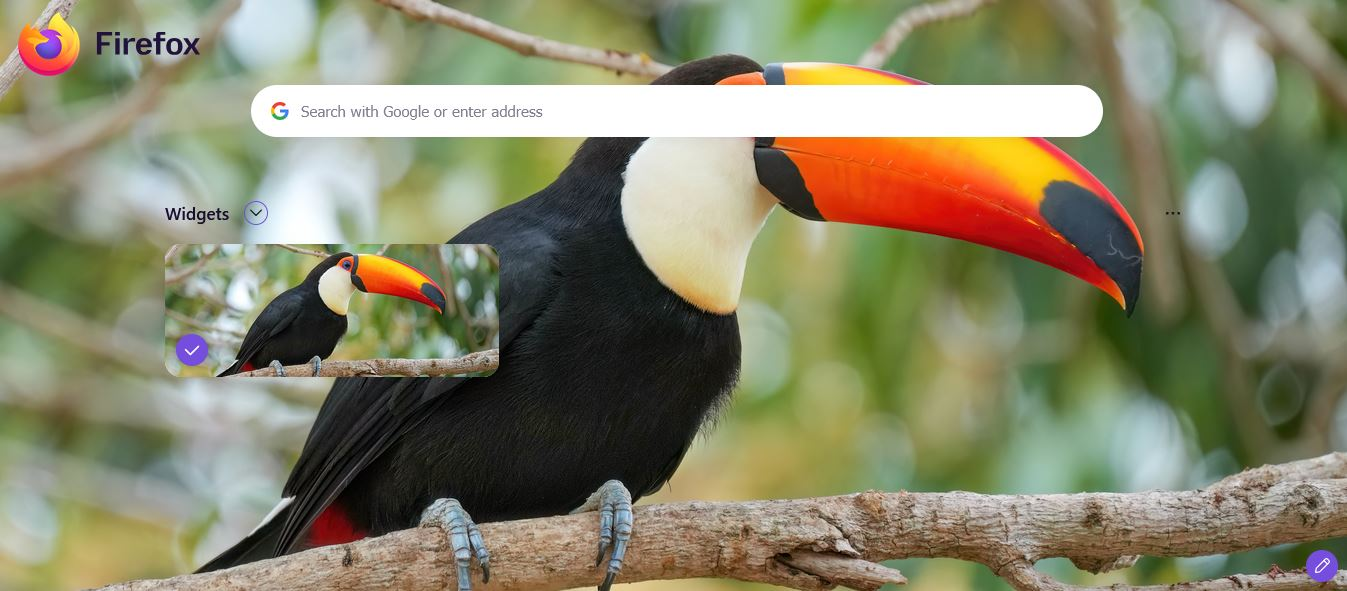
All Replies (2)

Your browser's home page seems to be a search engine :) which i do not use.
Every item/object on a screen has an ID you can then edit the object's location via a file called userChrome.css in the chrome folder of the current profile.
I have full control over my 'theme' but not an imported one, nor a firefox home page.
You may find helpful info via Settings > Appearance > Themes > Manage Themes > Build your own theme
Investigate the above may given you ideas.
Read up on userChrome for the basic workings.
Of course someone may come up with a simple solution.. So you want to see the Toucan's eye, maybe I will look into it when I have cleared my nest.
In settings for your home page, there's a "Firefox Home" section where you can turn off the search bar completely.