


Incoming email attachments
Whenever I get an email that says they are including an attachment, the attachment is never there. What is going on and how to I get email attachments. Any help is appreciated.
Thank you
All Replies (15)
When that happens, check your account's website to see if attachment is there. Also, try sending an attachment to yourself. It is not uncommon for people to say they are sending an attachment and forget to do so.
Hey David,
When I check my gmail webmail, the attachment is there. And, I did send myself a test with an attachment and it came through just fine.
Martha
I think you mis-understood my reply. When I check my GMAIL webmail, the attachment is there, but it is NOT there when I look at the same message in Thunderbird. They didn't forget the attachment. Why does it show in GMAIL, but not in Thunderbird?
Puzzling. Thunderbird has no such ability. It may be an antivirus or VPN stripping it as a possible security problem. I would check that first.

I have the same problem, I can see there is an attachment when I open my inbox, because it shows a paperclip. When I open the email with the regular viewer i see no attachment, but when I open the message in the classical reader the attachment shows at the bottom and i can open/save it.
hrrieck said
I have the same problem, I can see there is an attachment when I open my inbox, because it shows a paperclip. When I open the email with the regular viewer i see no attachment, but when I open the message in the classical reader the attachment shows at the bottom and i can open/save it.
Can you please explain what you mean by regular viewer and classical reader? Thanks!

I have the same problem with TB version 146.0.1 (64-bit). A paperclip indicates that the email has an attachment, but when I open the email in question, no attachment is there. I have tried test emails to myself from my Gmail account and from my Yahoo account: same result. When the same email is opened in either of those web based accounts, the attachment is there. I am not using a VPN. My only anti-virus program is the native Windows 11 program. I have only recently downloaded and installed TB as I am trying to distance myself from the "big boys", and the reviews I read seemed positively inclined toward TB. BUT, if I can't get this figured out, I will, of course, need to keep on searching for another email client.

kjanson said
I have the same problem with TB version 146.0.1 (64-bit). A paperclip indicates that the email has an attachment, but when I open the email in question, no attachment is there. I have tried test emails to myself from my Gmail account and from my Yahoo account: same result. When the same email is opened in either of those web based accounts, the attachment is there. I am not using a VPN. My only anti-virus program is the native Windows 11 program. I have only recently downloaded and installed TB as I am trying to distance myself from the "big boys", and the reviews I read seemed positively inclined toward TB. BUT, if I can't get this figured out, I will, of course, need to keep on searching for another email client.
So, you don't see the banner at the bottom of the message pane that shows the attachments, as in my attached image?
What happens if you change your view of the message from its default, like from HTML to Text? (Menu item View | Message Body as...) does the banner show up?
==
Look at the message source (View | Message Source, or Ctrl+U). You should see in the body a section similar to this, one for each attachment, followed by many line of random-looking text:
Njd6ss37N5A95dG6A0ONwXpI
Content-Type: application/pdf; name="TEST.pdf" Content-Disposition: attachment; filename="TEST.pdf" Content-Transfer-Encoding: base64
If I delete an attachment from the message from within Thunderbird I still see the above section header, but the encoded text is gone and there's a new line saying, "You deleted an attachment from this message. The original MIME headers for the attachment were:". If, say, your anti-virus had removed the attachment, I would expect to see something similar.
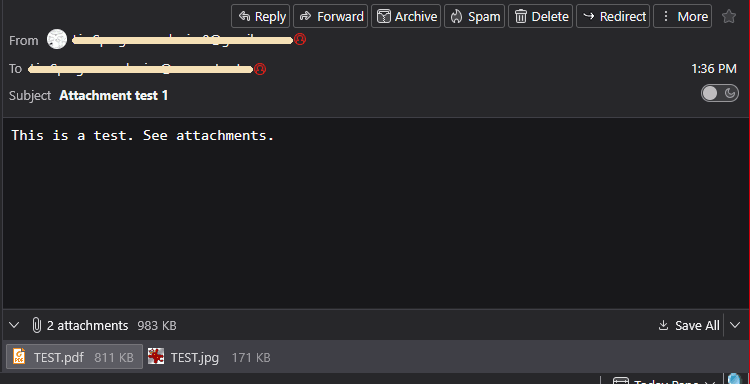
Modified by Lin
Lin, I do not see the banner in either the original view or as plain text. I do find the following: "--------------Z3MzvmWIMJdbXow0BXXTYNgn--
7SLxsKZHU1cWMDA8y6KLLdHN
Content-Type: application/pdf; name="Sandi Disbursement Sheet.pdf" Content-Disposition: attachment; filename="Sandi Disbursement Sheet.pdf" Content-Transfer-Encoding: base64" This is the name of the file that I attached in the test doc.
I should have replied to you, but I was expecting an email letting me know that someone had responded to my problem. I think you for your efforts.
Ken Janson
Interesting. I know of no way to intentionally or accidentally hide the message pane status bar that shows attachments. Are you using any add-ons that might impact display? You can restart Thunderbird in Troubleshoot Mode to test that (Help | Troubleshoot Mode...)
Is it possible that
You said you found the attachment section in the message source, but is it followed by many lines of text, like this?
p7YWuaDaWgBi1u0jPCnOxJNA
Content-Type: application/pdf; name="2025-12-10-OHC-market-commentary.pdf" Content-Disposition: attachment;
filename="2025-12-10-OHC-market-commentary.pdf"
Content-Transfer-Encoding: base64
JVBERi0xLjQNJeLjz9MNCjEzNSAwIG9iag08PC9MaW5lYXJpemVkIDEvTCAxMzkwNTgvTyAx MzcvRSAxMDc3MTkvTiAzL1QgMTM2MjM3L0ggWyAxMTM4IDM1NF0+Pg1lbmRvYmoNICAgICAg ICAgICAgDQp4cmVmDQoxMzUgNDENCjAwMDAwMDAwMTYgMDAwMDAgbg0KMDAwMDAwMTY3MCAw MDAwMCBuDQowMDAwMDAxODI5IDAwMDAwIG4NCjAwMDAwMDM2NzUgMDAwMDAgbg0KMDAwMDAw NDIzNCAwMDAwMCBuDQowMDAwMDA0ODU2IDAwMDAwIG4NCjAwMDAwMDUwNDAgMDAwMDAgbg0K MDAwMDAwNTE1NCAwMDAwMCBuDQowMDAwMDA1MjY2IDAwMDAwIG4NCjAwMDAwMDUzNjkgMDAw MDAgbg0KMDAwMDAwNTkzNiAwMDAwMCBuDQowMDAwMDA2NTg2IDAwMDAwIG4NCjAwMDAwMDY2 NzEgMDAwMDAgbg0KMDAwMDAwNzExNSAwMDAwMCBuDQowMDAwMDA3NjQxIDAwMDAwIG4NCjAw MDAwMDc4OTIgMDAwMDAgbg0KMDAwMDAwODIwNyAwMDAwMCBuDQowMDAwMDA4ODU3IDAwMDAw
etc.
=
I'm trying to see of the attachment is there and just not displayed for you, or if it has been stripped from the message. Your antivirus could possibly do that - one way to test it would be to temporarily disable it.
I find another setting that might make a difference: View | Display Attachments inline. I never noticed before and I'm a little unsure of what it does, but try it and see what happens.
By the way, best practice is to start a new thread for your issue rather than mixing it in with somebody else's. Since you got this far, probably best to continue it here.
Lin, Thanks for the quick reply. Yes, there is an alphabet soup of letters after the text you asked about. I relaunched TB in the trouble shooting mode, and YES, the attachment banner did appear at the bottom of the screen. BTW, I haven't added any extensions/add-ons to my TB since installing it. I tried selecting and then deselecting View | Display Attachments inline after exiting trouble shoot mode. If it did anything, I couldn't see it. This is making me crazy.
Ken
Am I correct in assuming that you are new to Thunderbird, and you have not installed any hacks that would affect the interface? I'm specifically thinking of userChrome.css , a file that can be manually created and edited to change the layout. I personally use a couple of the hacks, but they are not officially supported and can have unintended results. If I had a problem like yours, the first thing I'd do would be to disable that hack. I assume you would know if you had used them, but I thought I should ask.
The only thing I can suggest is that you create a new profile. The fact that things worked when you restarted in Troubleshooting mode suggests that something is corrupt in your profile. You will have to set up your email accounts again.
Otherwise, I'm just about out of ideas for now, sorry.
Yes, I am new to Thunderbird having been using Gmail for a long time, and, no, I had installed nothing after installing the basic program. Yesterday, however I installed the "Dark Message Mode" and it seems to work well. I did notice that the Windows task bar partially hid the last item in the InBox list, but upon hiding the taskbar the attachment link did not appear. Please know that I appreciate your attempt to help, and I agree that we might be at the end of corrective possibilities. Now (baring unexpected help from someone) I will have to decide if it will be less work to re-install Thunderbird or try a different client.
Thanks for trying,
Ken
Here's another idea for you: Try turning off hardware acceleration in Thunderbird (Tools | Settings | General | Use hardware acceleration when available) . Among other things, it can affect how visual elements are displayed. Considering that the attachments status bar came back when you restarted in Troubleshooting Mode, this seems to me to be a possible culprit.
This article describes what happens when you use Troubleshooting Mode: