


receiving emails

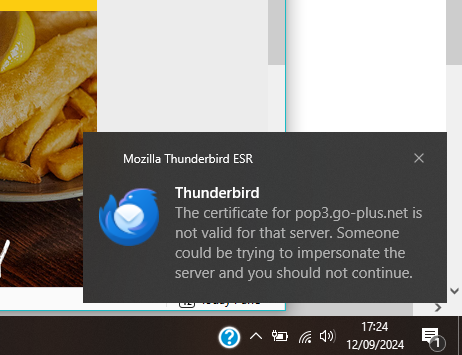
Since the latest update 128.2.0 I am getting message "The certificate for pop3.go-plus.net is not valid for that server. Someone could be trying to impersonate the server and you should not continue." when I try to receive emails. Everything worked fine up until today, even though I had to click an "Certificate Exemption" box after re-starting. How can I get to receive emails? They appear to send ok.
Modified by Mike Raw
All Replies (3)

Please post a screenshot of the certificate exception prompt. https://support.mozilla.org/kb/how-do-i-create-screenshot-my-problem
Chosen Solution
Unable to post a screenshot of Certificate Exemption prompt, as it was in a previous version of Thunderbird, which was updated to 128.2.0 yesterday. It was in a box which appeared after restarting the program when I tried to get messages from that email address. I would click on something like "Continue" and it would continue to work ok each time I clicked "Get all Mail" However, the new warning appears briefly from the bottom right of the screen and wont let me access the email address in question. See screenshot.

I am seeing almost the exact same message. The only difference is the domain name past the pop3.
I also tried:
- Clearing the previously saved exception.
- Unchecking the Query OSCP responder servers to confirm the current validity of certificates.
When I go into Manage Certificates and attempt to add an exception using pop3.nolans.us, it informs me that "The site provides valid, verified information. There is no need to add an exception"