


firefox appears to have gone berserk v150. windows 10

On my wifes PC Firefox appears to be doing random things. First the screen turned pink, then the taskbar icon has a gear-wheel overlaying it, and she is unable to do anything, like logging into zoom. Google searches work but clicking on any link goes nowhere and just sits. Is there a way of returning to it's previous boring but appreciated habit of just working, without uninstalling and re-installing from scratch please? thanks (she is currently using our fallback laptop in her office so I can't access her pc for an hour or so.)
การตอบกลับทั้งหมด (3)
Hello,
Try Firefox Troubleshoot Mode to see if the problem goes away. Firefox Troubleshoot Mode (previously known as Firefox Safe Mode) is a special diagnostic mode that temporarily turns off hardware acceleration, disables add-ons (extensions and themes) and resets some settings. See the Use Troubleshoot Mode in Firefox article for details.
If Firefox is open, you can restart in Firefox Troubleshoot Mode from the Help menu:
- Click the menu button
 , click Help, select Troubleshoot Mode and click Restart in the "Restart Firefox in Troubleshoot Mode?" dialog that opens.
If Firefox is not running, you can start Firefox in Troubleshoot Mode as follows:
- On Windows: Hold the Shift key when you open the Firefox desktop or Start menu shortcut.
- On Mac: Hold the option key while starting Firefox.
- On Linux: Quit Firefox, go to your Terminal and run firefox -safe-mode
(you may need to specify the Firefox installation path e.g. /usr/lib/firefox)
When the Firefox Troubleshoot Mode window appears, select "Open".
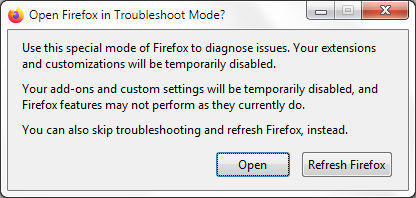
If the issue is not present in Firefox Troubleshoot Mode, your problem is probably caused by an extension, theme or hardware acceleration. Please follow the steps in the Troubleshoot extensions, themes and hardware acceleration issues to solve common Firefox problems article to find the cause.
To exit Firefox Troubleshoot Mode, just close Firefox and wait a few seconds before opening Firefox for normal use again. (If you can't exit Firefox Troubleshoot Mode, please see Firefox is stuck in Troubleshoot Mode).
When you figure out what's causing your issues, please let us know. It might help others with the same problem.
Thanks I'll give this a go next, so far I've done a Refresh (which should get rid of any extensions - which I don't have anyway) and changed the config setting to false, no difference. will let you know how I go.
Turns out that the gear wheel icon on top of the Firefox one is now a feature not a bug. Apparently it indicates which profile is being used. Having only one profile and never using any other makes no difference, it's a non-optional extra in some versions of Firefox (mine doesn't have it, my wife's does, though we're both on the same numeric version). My other problems, which were Zoom related, asking for browser permission to use the wrong microphone was because the Windows system settings point to the wrong microphone. A cold reboot and correcting system settings worked. (my next action will be to remove Zoom Workspace which interferes with the browser version.) Thanks for your help. PS the config setting I changed was, about:config, and set browser.profiles.enabled to false, which made no difference to the unwanted icon.