


Windows 10 reached EOS (end of support) on October 14, 2025. For more information, see this article.

ค้นหาฝ่ายสนับสนุน

Avoid support scams. We will never ask you to call or text a phone number or share personal information. Please report suspicious activity using the “Report Abuse” option.

เรียนรู้เพิ่มเติม

"Find" highlighted text background is really tough for this color blind person.

  • 1 การตอบกลับ
  • 0 คนมีปัญหานี้
  • 49 ครั้งที่ดู
  • ตอบกลับล่าสุดโดย TyDraniu

more options

Doing a "find" ends up showing a greenish (so I'm told) background with white text. Want to guess which "find" in the attached image is difficult for me to find?

What I would like: Find (focus): yellow text on black background Find All: white text on black background

Yes, of course it would be nice if that would auto switch to black on yellow if the website default is black background.

I can hack userContent.css and get the selection function to work:

/* General highlight (for text selection, etc.) */

selection {
   background: #FFFF00 !important;  /* Yellow background */
   color: #000000 !important;       /* Black text */

}

I can hack userContent.css and get the Find All (sans the focus) to work.

But firefox always provides the focus with white on green. Even if I do something like this:

/* Customize the color of highlighted search text */ input[type="search"]:focus::selection {

   background: #FFFF00 !important;  /* Yellow background */
   color: #000000 !important;       /* Black text */

}

I tried several themes. No change. I tried changing Windows Preferences. No change.

There must be a way to make this "find" feature useful for me.
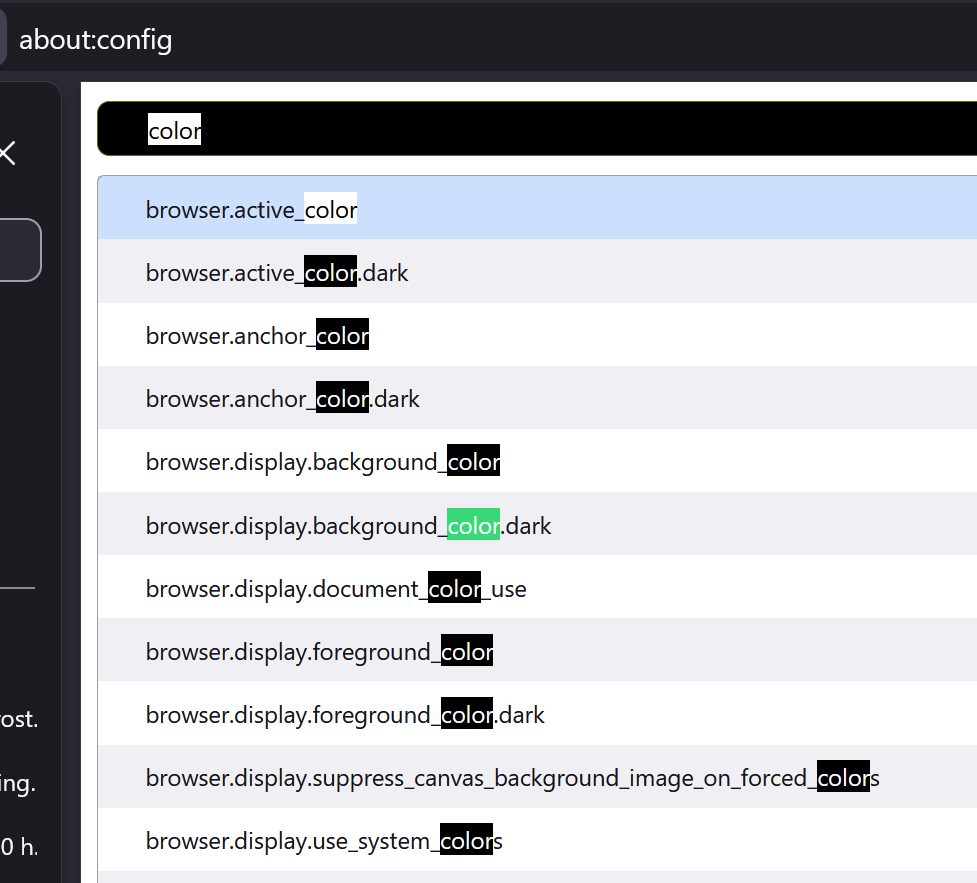
Doing a "find" ends up showing a greenish (so I'm told) background with white text. Want to guess which "find" in the attached image is difficult for me to find? What I would like: Find (focus): yellow text on black background Find All: white text on black background Yes, of course it would be nice if that would auto switch to black on yellow if the website default is black background. I can hack userContent.css and get the selection function to work: /* General highlight (for text selection, etc.) */ ::selection { background: #FFFF00 !important; /* Yellow background */ color: #000000 !important; /* Black text */ } I can hack userContent.css and get the Find All (sans the focus) to work. But firefox always provides the focus with white on green. Even if I do something like this: /* Customize the color of highlighted search text */ input[type="search"]:focus::selection { background: #FFFF00 !important; /* Yellow background */ color: #000000 !important; /* Black text */ } I tried several themes. No change. I tried changing Windows Preferences. No change. There must be a way to make this "find" feature useful for me.
ภาพหน้าจอที่แนบมา

การตอบกลับทั้งหมด (1)

more options

Go to about:config and type ui.text in the Search preference name textbox. It should give you 5 preferences that you can experiment with.

เปลี่ยนแปลงโดย TyDraniu เมื่อ

ถามคำถาม

You must log in to your account to reply to posts. Please start a new question, if you do not have an account yet.