


How to increase the font size in the right click context menu?

I'd like to make the font size larger in all the right click context menus. At the moment i have this in the userChrome.css file and it partially works:
- mainPopupSet menuitem { font-size: 12pt !important; }
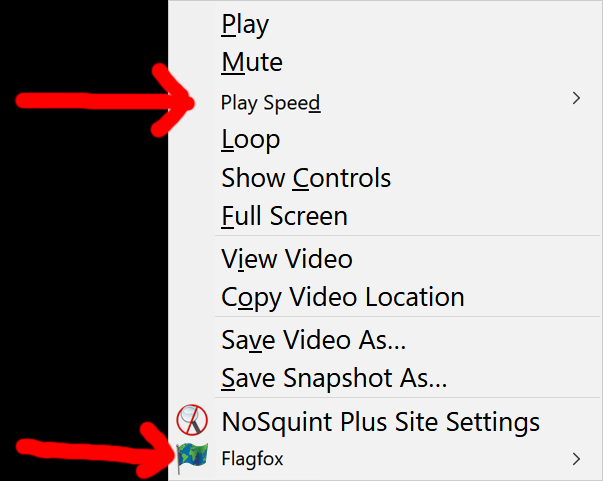
... But the one problem is that it doesn't change the font size for options that have a sub-menu (anything with a ">"). For example when right clicking on a video the "Play Speed >" font size remains unchanged. See the attached image for example.
Anyone know how this fix this? Thanks.
I'd like to make the font size larger in all the right click context menus.
At the moment i have this in the userChrome.css file and it partially works:
#mainPopupSet menuitem { font-size: 12pt !important; }
... But the one problem is that it doesn't change the font size for options that have a sub-menu (anything with a ">"). For example when right clicking on a video the "Play Speed >" font size remains unchanged. See the attached image for example.
Anyone know how this fix this? Thanks.
วิธีแก้ปัญหาที่เลือก
Hi Photek, those are <menu>, so you can add a second selector for the same rule:
#mainPopupSet menuitem,
#mainPopupSet menu {
  font-size: 12pt !important;
}
Does that work for you?
อ่านคำตอบนี้ในบริบท 👍 1การตอบกลับทั้งหมด (2)
วิธีแก้ปัญหาที่เลือก
Hi Photek, those are <menu>, so you can add a second selector for the same rule:
#mainPopupSet menuitem,
#mainPopupSet menu {
  font-size: 12pt !important;
}
Does that work for you?
Thanks very much jscher2000, that works perfectly!