


Firefox keeps crashing at random times

So recently firefox has started crashing on me at random times. It doesn't matter if I'm simply clicking on a link or if I walk away from the computer for a few minutes and then start moving the mouse, it just crashes on me. So far I've tried uninstalling shockwave and disabling plugins but nothing seems to be working. I've also made sure that firefox is up to date and reinstalled it once. It's really frustrating and I don't know what else to do.
การตอบกลับทั้งหมด (4)
hello, could you provide your latest few submitted crash reports? please enter about:crashes into the location bar, copy the latest few report ids from there starting with bp- & paste them here into a forum reply. this will give us a better understanding what may be triggering those crashes.
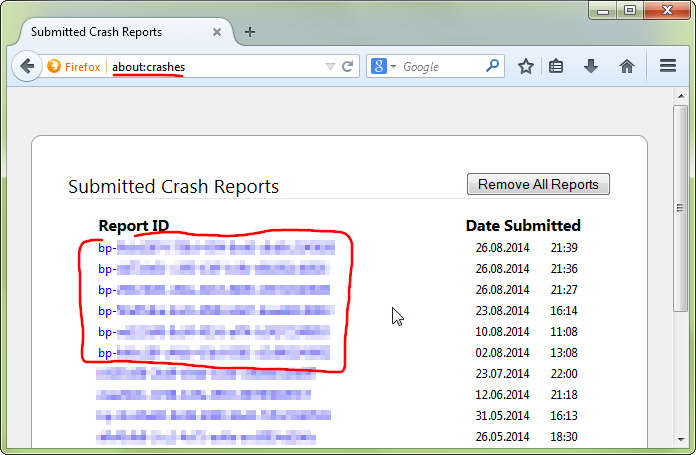
That's also the problem. It doesn't give me a particular message. It just freezes and then theres a 50/50 chance of it either working again or just stopping altogether.

Start Firefox in Safe Mode {web Link} by holding down the <Shift>
(Mac Options) key, and then starting Firefox. Is the problem still there?
Do a malware check with several malware scanning programs on the Windows computer. Please scan with all programs because each program detects different malware. All these programs have free versions.
Make sure that you update each program to get the latest version of their databases before doing a scan.
- Malwarebytes' Anti-Malware:
http://www.malwarebytes.org/mbam.php - AdwCleaner:
http://www.bleepingcomputer.com/download/adwcleaner/
http://www.softpedia.com/get/Antivirus/Removal-Tools/AdwCleaner.shtml - SuperAntispyware:
http://www.superantispyware.com/ - Microsoft Safety Scanner:
http://www.microsoft.com/security/scanner/en-us/default.aspx - Windows Defender:
http://windows.microsoft.com/en-us/windows/using-defender - Spybot Search & Destroy:
http://www.safer-networking.org/en/index.html - Kasperky Free Security Scan:
http://www.kaspersky.com/security-scan
You can also do a check for a rootkit infection with TDSSKiller.
- Anti-rootkit utility TDSSKiller:
http://support.kaspersky.com/5350?el=88446
See also: