


Running Firefox 11.0 on WinXP about:config value browser.newtab.url is missing and no way to load new tabs with home page. How do I fix this ?

Every tab opened from new tab box opens blank. there is no value in about:config to change. Can browser.newtab.url be added ?
தீர்வு தேர்ந்தெடுக்கப்பட்டது
this means that one of your other addons is interfering (and probably adware when it's redirecting to a search without your consent).
Read this answer in context 👍 0All Replies (10)
hello, the feature to add a custom new tab page was added in later versions of firefox, so this will be possible once you update firefox to its current version.
in addition firefox 11 is quite outdated and affected by numerous known security vulnerabilities, so i'd recommend updating as soon as possible!
Updated to 22.0 Now a search page loads in each new tab. After setting the browser.newtab.url to my homepage the search page still loads in every new tab.
In order to be able to find the correct solution to your problem, we require some more non-personal information from you. Please do the following:
- Click the Firefox button at the top left, then click the Help menu and select Troubleshooting Information from the submenu. If you don't have a Firefox button, click the Help menu at the top and select Troubleshooting Information from the menu.
Now, a new tab containing your troubleshooting information should open.
- At the top of the page, you should see a button that says "Copy text to clipboard". Click it.
- Now, go back to your forum post and click inside the reply box. Press Ctrl+V to paste all the information you copied into the forum post.
If you need further information about the Troubleshooting information page, please read the article Use the Troubleshooting Information page to help fix Firefox issues.
Thanks in advance for your help!
can you check if the same thing is happening when you launch firefox in safe mode once in order to rule out the influence of any extension...
Troubleshoot extensions, themes and hardware acceleration issues to solve common Firefox problems
Hello,
The Reset Firefox feature can fix many issues by restoring Firefox to its factory default state while saving your essential information. Note: This will cause you to lose any Extensions, Open websites, and some Preferences.
To Reset Firefox do the following:
- Go to Firefox > Help > Troubleshooting Information.
- Click the "Reset Firefox" button.
- Firefox will close and reset. After Firefox is done, it will show a window with the information that is imported. Click Finish.
- Firefox will open with all factory defaults applied.
Further information can be found in the Refresh Firefox - reset add-ons and settings article.
Did this fix your problems? Please report back to us!
Thank you.
Application Basics
       Name
       Firefox
       Version
       22.0
       User Agent
       Mozilla/5.0 (Windows NT 5.1; rv:22.0) Gecko/20100101 Firefox/22.0
Build Configuration
about:buildconfig
Extensions
Name
Version
Enabled
ID
       Adblock Plus
       2.2.3
       true
       {d10d0bf8-f5b5-c8b4-a8b2-2b9879e08c5d}
       Classic Compact Options
       10.0.1
       true
       notreal.ccoptions@environmentalchemistry.com
       Exif Viewer
       2.00
       true
       exif_viewer@mozilla.doslash.org
       FireFox Tweak
       3.0
       true
       firefoxtweak@pribic.am
       Screengrab  (fix version)
       0.97.12c
       true
       {02450914-cdd9-410f-b1da-db004e18c671}
       SpeedFox
       1.2.54
       true
       jid1-uabu5A9hduqzCw@jetpack
       Troubleshooter
       1.1a
       true
       troubleshooter@mozilla.org
       Kaspersky URL Advisor
       12.0.1.511
       false
       linkfilter@kaspersky.ru
       Kaspersky Virtual Keyboard
       12.0.1.511
       false
       virtualKeyboard@kaspersky.ru
       Microsoft .NET Framework Assistant
       0.0.0
       false
       {20a82645-c095-46ed-80e3-08825760534b}
Important Modified Preferences
Name
Value
       accessibility.typeaheadfind.casesensitive
       1
       accessibility.typeaheadfind.flashBar
       0
       browser.cache.disk.capacity
       1048576
       browser.cache.disk.smart_size.first_run
       false
       browser.cache.disk.smart_size_cached_value
       1048576
       browser.places.importBookmarksHTML
       false
       browser.places.smartBookmarksVersion
       4
       browser.startup.homepage
       www.google.com
       browser.startup.homepage_override.buildID
       20130618035212
       browser.startup.homepage_override.mstone
       22.0
       browser.tabs.loadInBackground
       false
       browser.tabs.onTop
       false
       dom.max_chrome_script_run_time
       0
       dom.max_script_run_time
       0
       extensions.checkCompatibility
       true
       extensions.lastAppVersion
       22.0
       gfx.blacklist.direct2d
       3
       gfx.blacklist.layers.direct3d10
       3
       gfx.blacklist.layers.direct3d10-1
       3
       gfx.blacklist.layers.direct3d9
       3
       gfx.blacklist.layers.opengl
       3
       gfx.blacklist.suggested-driver-version
       257.21
       gfx.blacklist.webgl.angle
       3
       gfx.blacklist.webgl.msaa
       3
       gfx.blacklist.webgl.opengl
       3
       network.cookie.prefsMigrated
       true
       network.http.max-connections
       32
       network.http.max-connections-per-server
       8
       network.http.max-persistent-connections-per-server
       4
       network.http.pipelining.maxrequests
       8
       network.http.proxy.pipelining
       true
       places.database.lastMaintenance
       1371947301
       places.history.expiration.transient_current_max_pages
       51988
       plugin.disable_full_page_plugin_for_types
       application/pdf
       plugin.importedState
       true
       privacy.donottrackheader.enabled
       true
       privacy.sanitize.migrateFx3Prefs
       true
       privacy.sanitize.timeSpan
       0
       security.warn_viewing_mixed
       false
       storage.vacuum.last.index
       1
       storage.vacuum.last.places.sqlite
       1371328554
Graphics
       Adapter Description
       NVIDIA GeForce 6150SE nForce 430
       Adapter Drivers
       nv4_disp
       Adapter RAM
       Unknown
       Device ID
       0x03d0
       Direct2D Enabled
       Blocked for your graphics driver version. Try updating your graphics driver to version 257.21 or newer.
       DirectWrite Enabled
       false (0.0.0.0)
       Driver Date
       3-15-2010
       Driver Version
       6.14.11.9713
       GPU #2 Active
       false
       GPU Accelerated Windows
       0/1 Basic Blocked for your graphics driver version. Try updating your graphics driver to version 257.21 or newer.
       Vendor ID
       0x10de
       WebGL Renderer
       Blocked for your graphics driver version. Try updating your graphics driver to version 257.21 or newer.
       AzureCanvasBackend
       skia
       AzureContentBackend
       none
       AzureFallbackCanvasBackend
       cairo
JavaScript
       Incremental GC
       true
Accessibility
       Activated
       false
       Prevent Accessibility
       0
Library Versions
Expected minimum version
Version in use
       NSPR
       4.9.6
       4.9.6
       NSS
       3.14.3.0 Basic ECC
       3.14.3.0 Basic ECC
       NSSSMIME
       3.14.3.0 Basic ECC
       3.14.3.0 Basic ECC
       NSSSSL
       3.14.3.0 Basic ECC
       3.14.3.0 Basic ECC
       NSSUTIL
       3.14.3.0
       3.14.3.0
https://addons.mozilla.org/en-US/firefox/addon/custom-new-tab/
- Download the Addon above.
- After it installs, go to the Firefox Menu or Tools > Addons > Extenstions > Custon New Tab > Prefrences Button
- A new window should show like this. Type in what you want to load on a new tab.
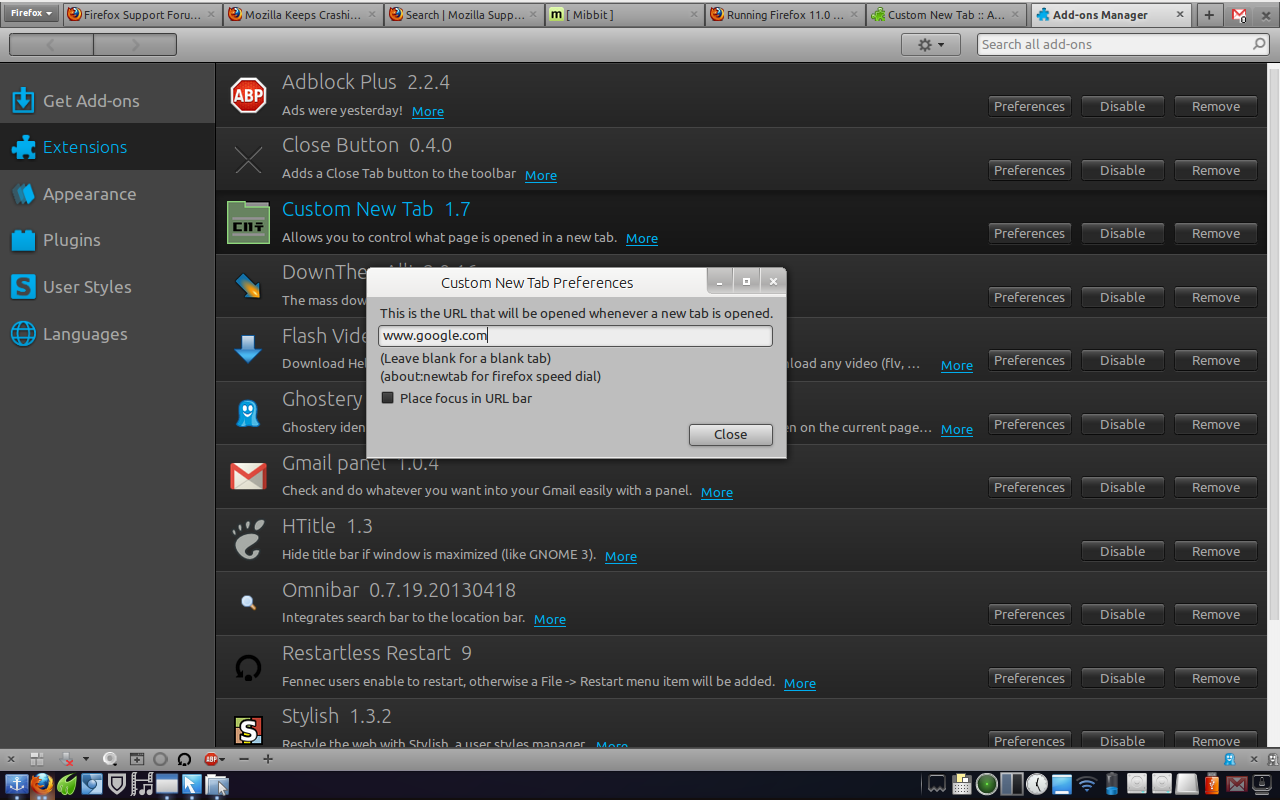
Downloaded addon above. Set to home page. New tab still opens in a search page the same as it did when I downloaded FF 22.0 a half hour ago. Only way to get my home page to load in new tab is safe mode
தீர்வு தேர்ந்தெடுக்கப்பட்டது
this means that one of your other addons is interfering (and probably adware when it's redirecting to a search without your consent).
Disabled SpeedFox 1.2.54 and problem is solved. Thanks for all the help