


Each page opens with smallest text and size. I have to manually zoom each page.

Every page opens in small size and small text. I can zoom larger, but any new pages changes to small. Happened on old XP pc and on new Windows 7 PC.
All Replies (8)
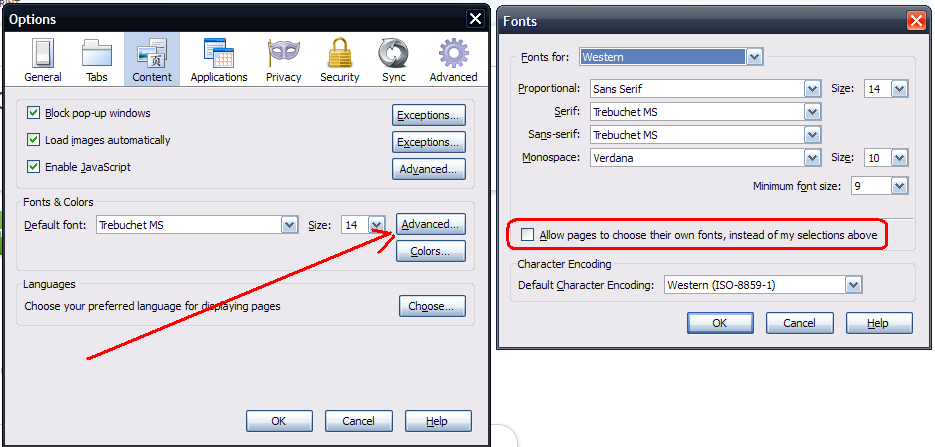
Click the Firefox button, go to Options | Options | Content and in the Fonts & Colors menu, click the Advanced button.
In the next menu, set Minimum Font Size to "9" (or larger depending on your own personal taste).
Below that, remove the checkmark from "Allow sites to choose their own fonts....".
See screenshot taken from my own personal settings.
You can use one of these extensions to set a default font size and page zoom on web pages:
- Default FullZoom Level: https://addons.mozilla.org/firefox/addon/default-fullzoom-level/
- NoSquint: https://addons.mozilla.org/firefox/addon/nosquint/
Did not work, but thank you.
Jim
Did not help. Firefox was fine till upgraded to 4 on my XP. Same problem on Windows 7. Thank you for the reply.
Did you try one of the two extensions to set a global zoom factor?
Install this add-on: https://addons.mozilla.org/en-US/firefox/addon/theme-font-size-changer/
Setting Global solved it. Thank you!
The Global settings did it. Many thanks!