


POP3 Message Downloads

Recently I have noticed some changes in the way my Thunderbird downloads POP3 messages. Previously, it would be common to ask for new messages once a day and receive upwards of one hundred of them. But in the last month, this number has been limited to about 35 at a time. If I ask immediately again, I get about 35 more, and this pattern continues as long as there are messages in queue waiting to be downloaded. I am not sure if this is due to changes in gmail, where most of my received messages originate, or to changes in Thunderbird itself, or to some sort of third-party hack. Now that I have trained myself to keep on asking until there are no more messages coming down, this change does not cause me much difficulty, although initially it sometimes caused me to overlook messages because I failed to keep asking as long as I should have. Apart from that, it does not seem to be harmful as far as I can tell. I'd just like to know if other people have noticed anything similar, and if anyone knows what is causing it, and whether it has some hidden advantages over the way things used to work.
All Replies (16)
Hello
To see if.
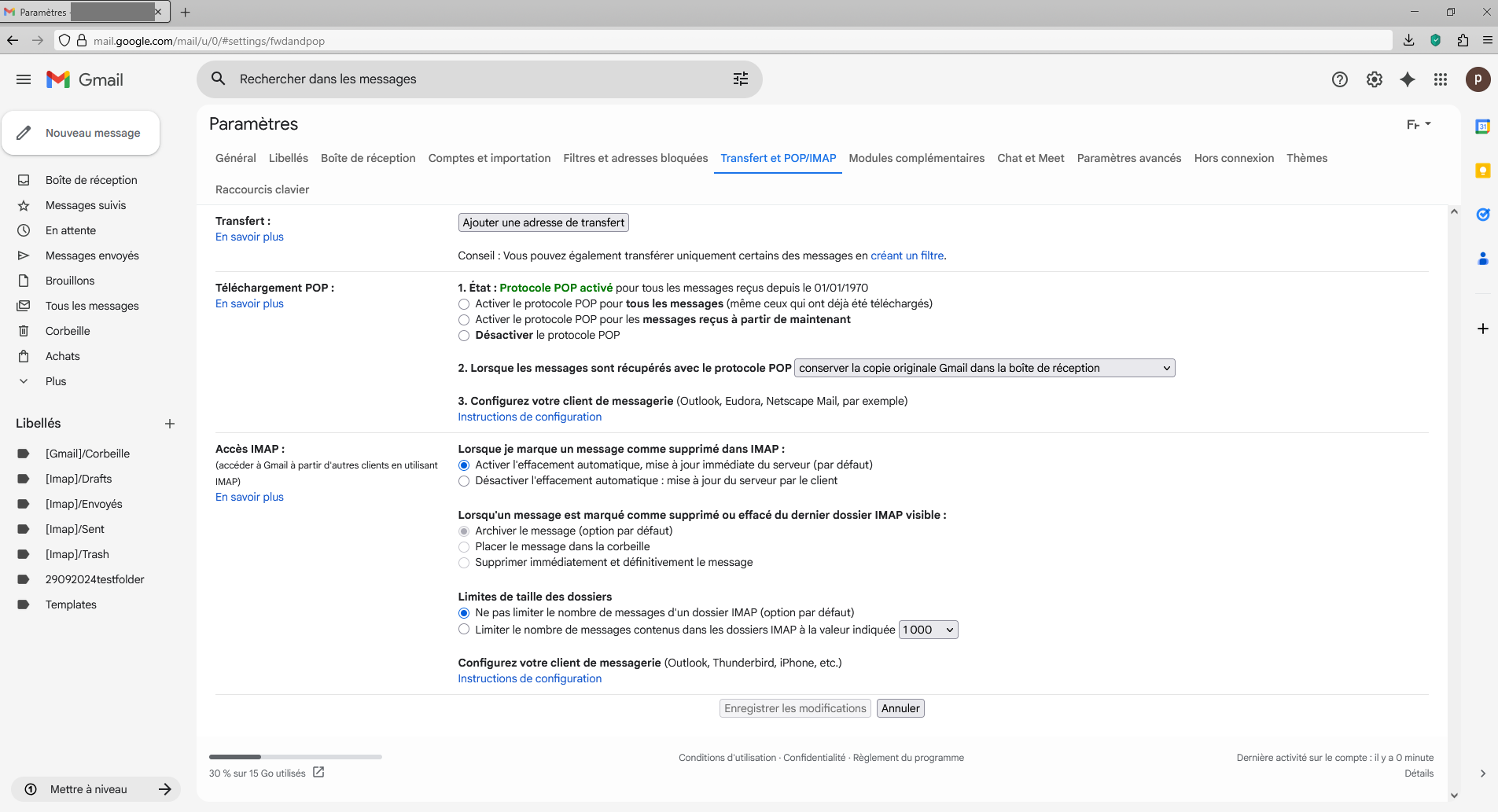
You can try. Go to https://mail.google.com and connect. Then, Top right, Settings > See all settings. Click the Forwarding and POP/IMAP tab. Disable POP protocol. Then, at the bottom of the page, click on Save changes. Enable POP protocol. Then, at the bottom of the page, click on Save changes.
Thank you. I will let you know if it works.
The situation has become much more serious now because now the only response I get when I ask for my messages in Thunderbird for the last 24 hours is "no new messages to download". Absolutely zero.
I can see on my telephone that there are plenty of messages there, but Google is not letting Thunderbird have any of them.
Do you think this is Google's way of trying to force me to move to IMAP?
I wish to report that I tried the above suggestion by Agent virtuel and it did not work, at least not immediately. There was a little notice to the effect that it might take some time, so maybe there is still a chance for me to receive my missing emails via Thunderbird.
I have seen that Gmail is in the process of making other changes to their system (see https:///askleo.com/186261) . The change mentioned there is not exactly the one that affects me, but it appears there is some mischief afoot. I have difficulty believing that I am the only Gmail/Thunderbird user who is affected by this change. I know POP3 is out of fashion, but there must be other users experiencing what I am experiencing.
While I search for a workaround, I am going to continue reporting my experience with this change. I have a long history with both Gmail and Thunderbird, and this will be extremely disruptive for me if I cannot continue to use them together.
pjmorton said
, or to some sort of third-party hack.
That is a good way to look at your antivirus. I would guess you don't use defender. GMail and Thunderbird have not changed anything, but I bet your antivirus has, it is probably crashing and you are therefore only getting some of your mail. Or it might just be so slow that the connection get dropped be the server through inactivity before all the mail gets downloaded.
As for the ask leo link, it is about time Google did that. But please use the source instead of the hearsay link. It is certainly nothing sinister. https://support.google.com/mail/answer/16604719?hl=en#:~:text=Starting%20January%202026%2C%20Gmail%20will%20no%20longer,with%20POP%2C%20will%20no%20longer%20be%20supported.
It does cause issues in this forum with folk posting about getting two of every email because they set the same account up in Thunderbird and gmail both offer copies of the received email.
Good news. A few hours ago I found that Agent Virtuel's solution had taken effect. After erasing my old POP3 preferences, I re-authorized the downloading of all new emails and now the rationing seems to be gone. As far as I can tell it is back to emptying the entire tank at one go. I got 72 this morning, and the most recent one was only a few minutes old. I would prefer to wait a while and make sure the situation is stable before declaring the problem solved, but it is certainly well on the way.
I had to sacrifice the emails that I missed during the two days when nothing would download. I could view them on the Google webmail site and see that they contained nothing vital, but the only way I could see to get them into Thunderbird would have been to request the entire re-download of every Gmail I had received since 2007. I actually experimented with that briefly, and it was an interesting trip down memory lane, but I gave up at about 2011 as the volume increased - Life is too short...
The problem surely did originate with some change external to my system, but there was no delay or evidence of any breakdown. Just an immediate response to "Get new messages" that no new messages were available. Since it was addressable (with some delay) by erasing and re-submitting my Gmail preferences, I assume that this was where it originated, but it must have been a rare situation not affecting very many others, or we would have heard from them.
My thanks to Agent virtuel for pointing me in the right direction.
The above mentioned problem has reoccurred, only this time the spigot was turned off all at once, without the staged reduction in the number of messages downloaded in response to each request. Once again I used Agent Virtue's suggested solution and it seems to have worked although I am doubtful to call the problem solved, since it has come back within a month.
Odds are this is not a Thunderbird problem but a Google problem. When I logged into Google directly I saw that my choice to "download POP messages received from now on" had been erased. I selected the same choice once again and saved it and now it seems to work once again. But something that has now happened twice seems likely to go on happening. I'm glad to see that nobody else is reporting the same problem, but it leaves me in the dark what I am doing to expose myself to this risk.
These symptoms could occur if your phone account is POP and it is not set to leave messages on the server.
Then your phone and computer are contending to be the first and only client to fetch new messages.
As far as I know, that's not the case. Not by design on my part. I frequently look at my messages on my phone, and only download them once or twice a day to Thunderbird/Windows. So if my gmail android app were not leaving a copy on the server, it would be a continuous problem, not one that goes away and then returns a month later. But thanks for the suggestion. I don't use the Thunderbird Android app at this time, and this is something I will have to watch out for if I try to set it up in the future.
After an uneventful 55 days of uninterrupted email service the problem has cropped up again. Again I fixed it using Agent Virtuel's remedy, but as usual the fix applies only to future emails - there is no simple way to recover the messages that failed to come down, although they can be read on my android phone and forwarded to other addresses. This is a laborious and imperfect solution.
Again I have to stress that I can't be sure that T'bird contributes in any way to the malfunction. Clearly Gmail has at least a passive role because the problem has to be fixed through Gmail, but it may be triggered through some obscure bit of code in Thunderbird, or by some other program running in the background in my Windows setup. It must be uncommon - no other user has reported it.
I can certainly live with a problem that claims a bit of my time at widely-spaced intervals. However I live in fear that one day Gmail will rearrange their settings interface to hide the POP3 controls, or force users to make all adjustments through some uncomprehending AI robot.
Matt's idea about anti-virus software is worth investigating. You should start Windows in safe mode with networking and see if the problem persists.
I first experienced the problem November 3 and then again 33 days later on December 6 and most recently 55 days later on January 29. So how long would I have to use Windows in safe mode, and at what point would it be safe to conclude that the problem had stopped recurring?
I have no way to answer that question. Solving intermittent problems is difficult. Maybe the intermittent nature of the problem is evidence that anti-virus software is not the cause. I do not know. Sorry.
Which anti-virus software are you using?
A common recommendation on the forum is to use only Microsoft's anti-virus software. If people don't want to do that, the next recommendation is to create an exception for Thunderbird in the third-party anti-virus software. Have you already done that?
On its face it doesn't make sense to me to pay for antivirus protection and then make an exception for e-mails. Better to remove the antivirus from the machine where I usually download my email. That machine runs Windows 11, so I would default to Bit Defender protection if I were to remove Norton. I know that it is rare these days for a virus to actually get past the native protection included with Windows, and even if I were to see behavior that might be associated with a virus, I have full system Macrium backups which should be able to wipe it out.
However I must say that while using Norton I have never seen the popups and messages that "inaheap" complained about. I also appreciate the other services and security advice that my Lifelock subscription provides. My 8-year experience with them has been problem-free.
Note that I do not subscribe to 365 and I minimize my use of One Drive. I think the whole Windows 11 OS has taken a serious wrong turn with Recall, One-drive, Co-pilot, involuntary Bit-Defender etc. I am trying to get comfortable with Linux Mint so that I can confidently move my e-mail activity away from both Norton and Microsoft. I am glad to know that Thunderbird is available there too, but I am still trying to figure out how to manage my sbd data, which as a POP3 user, I must hold locally. A subject for a different discussion.