


Firefox crashes on every boot
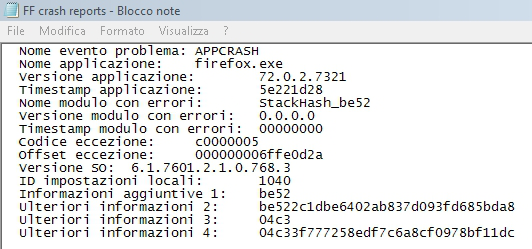
Hello, my name is Andrea and I'm writing from Italy. I used firefox (72.0.2, 64 bit, Windows 7 with two users account) up to two days ago but yesterday it started to crash on every boot. It isn't possible to start FF in safe mode; I tried to uninstall completely FF (also the file in C:\program files etc.) and reinstall but the crashes continue. I run a memtest (memtest86) and the memory is Ok. The only way to run FF is in Windows safe mode (I'm writing with FF in Windows safe mode). I'd like to continue using FF in the future but I can't do it... Could you help me? Thanks a lot Andrea
தீர்வு தேர்ந்தெடுக்கப்பட்டது
Hi Andrea,
have you been using Comodo software in the past? See https://support.mozilla.org/it/kb/Firefox%20non%20si%20avvia#w_firefox-non-si-avvia-dopo-un-aggiornamento
Read this answer in context 👍 0All Replies (3)
தீர்வு தேர்ந்தெடுக்கப்பட்டது
Hi Andrea,
have you been using Comodo software in the past? See https://support.mozilla.org/it/kb/Firefox%20non%20si%20avvia#w_firefox-non-si-avvia-dopo-un-aggiornamento
Hi TyDraniu, I'm still using Comodo Firewall and Antivirus (an old version...). I'll try to work on this.
Thank you so much, Andrea
Hi Ty Draniu, I have uninstall the old version of Comodo antivirus and I install an new version. Now FF works fine!
Thank you so much for the help, regards,
Andrea