


how do you refresh the page?

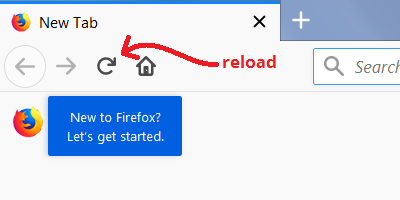
I cant see a refresh symbol anywhere, how do you refresh the page?
I cant see a refresh symbol anywhere, how do you refresh the page?
தீர்வு தேர்ந்தெடுக்கப்பட்டது
Reload F5 Ctrl + R
Reload (override cache) Ctrl + F5 Ctrl + Shift + R
All Replies (3)
You can always press ctrl+r to refresh any page. Regarding the refresh symbol, try menu-> customize and if it's there, you can drag and drop to it's correct position.
As a footnote, here's a picture of the Reload button for reference:
<center> </center>

தீர்வு தேர்ந்தெடுக்கப்பட்டது
Reload F5 Ctrl + R
Reload (override cache) Ctrl + F5 Ctrl + Shift + R