


The jpeg photo for this web page will not show. https://www.roanokeva.gov/1687/StarCam Troubleshooting steps has not provided a consistent solution. Any ideas?

The Starcam image displays in Internet Explorer and Google Chrome. Troubleshooting steps have allowed the image to display a single time (the page refreshes the image on a timer). I installed Firefox to troubleshoot the issue for a citizen who uses Firefox and have had little success in resolving the issue and need help from others more familiar with Firefox please.
Thanks!
Frank
fvineyard மூலமாக திருத்தப்பட்டது
All Replies (8)
Screenshots of the web page working and Firefox with no image (broken page icon).
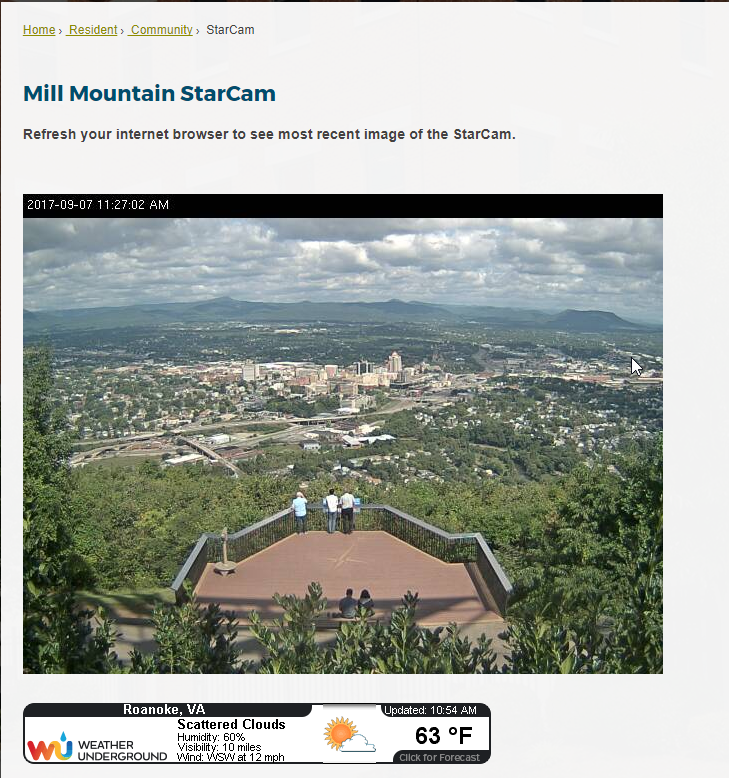
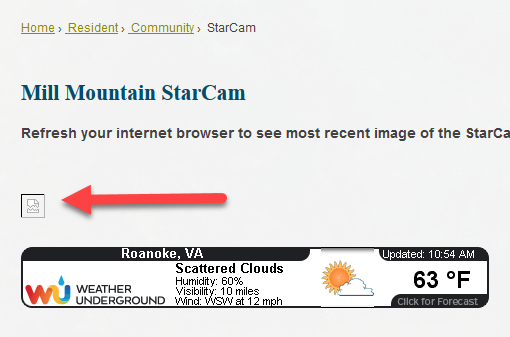

Please provide public (no password) link(s) that we can check out. No Personal Information Please !
Are you using any blocking programs/add-ons?
Start Firefox in Safe Mode {web link} by holding down the <Shift> (Mac=Options) key, and then starting Firefox.
A small dialog should appear. Click Start In Safe Mode (not Refresh). Is the problem still there?
I'm seeing this as well and the image link isn't working at the moment.
- https://www.roanokeva.gov/1687/StarCam
- http://roanokeweb.roanokeva.gov/extcityservices/api/citycams/v1/getjpg/sc03
The other browsers might be showing a cached image.
Did try to reload the page and bypass the cache in the other browsers?
When I load the image URL in its own tab, I see the image briefly before Firefox declares it to be broken:
http://roanokeweb.roanokeva.gov/extcityservices/api/citycams/v1/getjpg/sc03
Same occurs each time I reload the page (Ctrl+r).
Firefox's Web Console shows: "Image corrupt or truncated."
(I don't think it's truncated: the image is sent uncompressed and appears to be the size it was declared to be by the server (confirmed by right-clicking the broken picture image and using Save Image As).)
The only unusual things I notice are:
- no .jpg extension on the image URL
- server sends image/jpg instead of image/jpeg
I get an "Unable to connect" error page, so there is no server response at all.
Update:
Safe mode does not help. Still a broken link.
In other browsers the picture is not from cache and it does update when I refresh the page manually. I misspoke on the auto-refresh, as it only updates the photo on a manual refresh.
I appreciate the suggestions. Is it possible that something on the server side that needs to change in order for Firefox to work reliably? We have developer staff looking into that as well. Any suggestions on the web server side are appreciated as well.
Frank
cor-el said
The other browsers might be showing a cached image.
I opened the link in IE. After a few minutes, I refreshed the page. The timestamp was updated. https://www.roanokeva.gov/1687/StarCam
I can't even ping the server with the image successfully and even using a proxy doesn't work, so I do not know why the image server works for some and not for others.
- ping http://roanokeweb.roanokeva.gov
PING roanokeweb.roanokeva.gov (4.79.207.90) 56(84) bytes of data