


when i first started firefox it let me change my color now it does not show any colors to change anythnk

"something is very wrong with firefox", when i first downladed it i went to the thing that looked like a wheel and it let me change my colors the way i wanted them on any web site then just "POOF" i went there and now all it shows is blank boxes can anyone p;z help me....
All Replies (1)

Hi, firstly please note that you should only download Firefox from Mozilla.org to prevent it from potentially being bundled with junk.
You may have an issue with one of your extensions (possibly 'A component of your photo software powered by RocketLife') so please Try Firefox Safe Mode to see if the problem goes away. Firefox Safe Mode is a troubleshooting mode that temporarily turns off hardware acceleration, resets some settings, and disables add-ons (extensions and themes).
If Firefox is open, you can restart in Firefox Safe Mode from the Help menu:
- Click the menu button
 , click Help
 and select Restart with Add-ons Disabled.
If Firefox is not running, you can start Firefox in Safe Mode as follows:
- On Windows: Hold the Shift key when you open the Firefox desktop or Start menu shortcut.
- On Mac: Hold the option key while starting Firefox.
- On Linux: Quit Firefox, go to your Terminal and run firefox -safe-mode
(you may need to specify the Firefox installation path e.g. /usr/lib/firefox)
When the Firefox Safe Mode window appears, select "Start in Safe Mode".
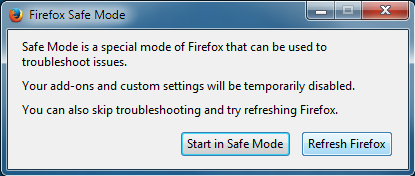
If the issue is not present in Firefox Safe Mode, your problem is probably caused by an extension, theme, or hardware acceleration. Please follow the steps in the Troubleshoot extensions, themes and hardware acceleration issues to solve common Firefox problems article to find the cause.
To exit Firefox Safe Mode, just close Firefox and wait a few seconds before opening Firefox for normal use again.
When you figure out what's causing your issues, please let us know. It might help others with the same problem.