


Awful Australis (seriously guys, this sucks) won't let me put buttons on the menu bar, so is there a way I can do that?

Ubuntu 14.04 Firefox 29.0 Customization of toolbar procedure is much more trouble than it was on 28. Drag and drop doesn't work and although I restored the menubar with Classic Theme Restorer, I can't move any buttons to it. I thought I had it working briefly but then another update broke it and I had to purge and reinstall Firefox. Now retweak my UI. Is there a fix for this or should I start looking at other browsers. Firefox used to rock but you guys break extensions right an left with your change-at-any-cost-as-fast-as-possible-with-or-without-real-utility attitude.
தீர்வு தேர்ந்தெடுக்கப்பட்டது
Gingerbread Man, Cor-el,
Thank you, both. Indeed, it was my theme. The default interacts horribly with my system theme, and won't let me see the text of the buttons I'm dragging at all, nor the icon very well, but since you pointed me to the method of diagnosis and I know what the problem is, I can work with it. In the worst case, I can probably switch back and forth and drag buttons semi-blind. Or possibly I can find some other theme that will render the buttons and their labels clearly without blocking drag and drop and use it for just this purpose and then switch back. Or maybe I can tweak colors on the standard theme. So I have a clear path.
Thanks, much.
========================
Added later by editing:
For the benifit of anyone who may find this searching for solutions to similar problems, I'll summarize what I found:
I looked at a whole lot of themes, maybe 40 or so. All of them were at least partly broken in some way or another running in the Australis environment on my system. Which is 32 bit Ubuntu 14.04 Trusty, the current one, using plain Openbox as the DE. No Lubuntu, no LXDE, just plain Openbox, with an Nvidia card with the current driver on a system with 4 gi B of RAM, and one of the dual core AMD cpus. With different setups YMMV.
For example, the default theme:
"New tab" button normally to the right of the right most tab is gone. This is true with or without Classic Theme Restorer and/or Big New Tab Button 2.
In the customise tab, in the panel with the heading "Additional Tools and features" where buttons are dragged to and from :
-The icons are small and pale against an off white backgrond and almost indistinguishable from one another in consequence.
-The text labels for the icons only flicker momentarily while they are being dragged and even then the label is truncated. At all other times they are completely invisible.
-There is no demarcation between the top of the panel where buttons can not be dragged to and the part below where they can.
The great majority of the other themes I looked at were totally broken. They flickered dramatically, showed some page elements on top of others, or text labels and/or icons were invisible.
So I concentrated only on the default theme, my heretofore preffered theme LCARSTrek, and themes that had "Australis" as part of the name. There aren't but a handful of those. These did much better. None of them were totally broken as so many of the others are, but none of them work completely either. All had at least one of the following issues:
-Drag and Drop is disabled in the Customise tab. If you are testing themes for yourself don't jump to this conclusion without testing carefully. If, as on most of the themes I tested, there is no demarcation in the Customise tab between the top of the left panel where buttons can not be dragged to and the part below where they can and you aren't careful to be sure you dropped in the right place you may falsely conclude the theme you are testing is one of those in which drag-n-drop is disabled, when in fact it isn't.
-The about:config setting browser.tabs.closeButtons;3 is not honored. This is true of most of them.
-The new tab button is missing.
-Significant parts of the GUI are rendered with foreground/background combinations in which the colors are either identical or so similar as to be indistinguishable. In some this was the case in menus or tabs. In many it was the case in the panel in the Customise tab mentioned above.
One thing I tried I'd caution against:
I used the "theme font and size" extension to try tweaking the default theme's colors. Bad idea. I almost didn't find my way back. It wasn't just a case of not being able to read menus. There was a lot of flickering involved also, with menus that would pop up and go away if I wasn't quick enough. Don't try this unless you are prepared to purge and reinstall.
For me the solution is to switch back and forth between the "LCARSTrek" theme and the "Metal Lion Australis Graphite" theme. while I get things arranged.
I've spent about 3 days trying to straighten out what Australis broke for me and it looks like it will take me another day before I'm finished. I did mark this "solved" because I do have a clear path to the goal now, even if I'm not actually there yet.
I do appreciate the assistance given, but I must admit that all in all, I am not impressed by Mozilla's handling of Australis. If anyone forks Firefox with the stated intent of putting a higher priority on making it work well in 'nix systems, and keeping it as stable as possible so as not to break extensions, themes, scripts, and plugins unless it is absolutely necessary, I'd be among the first in line to try it.
Lew_Rockwell_Fan மூலமாக திருத்தப்பட்டது
All Replies (3)
You don't need Classic Theme Restorer for the menu bar. Simply right-click an empty area of the tab bar and make sure "Menu Bar" is checked. To move items to the menu bar, right-click an empty area of the tab bar and choose Customize, then drag whatever buttons you want onto the menu bar.
If that's not working for you, one of your add-ons may be interfering.
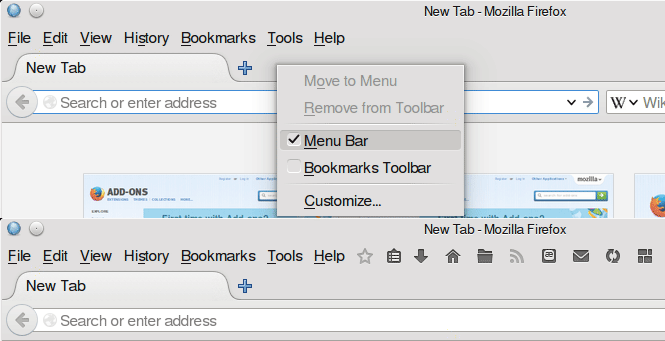
Note that Ubuntu 11.xx and later displays menus in the control bar at the top of the screen with the switch to the Unity window manager and you won't be able to add other items to this bar.
You may have to disable the extensions that Ubuntu adds to Firefox.
தீர்வு தேர்ந்தெடுக்கப்பட்டது
Gingerbread Man, Cor-el,
Thank you, both. Indeed, it was my theme. The default interacts horribly with my system theme, and won't let me see the text of the buttons I'm dragging at all, nor the icon very well, but since you pointed me to the method of diagnosis and I know what the problem is, I can work with it. In the worst case, I can probably switch back and forth and drag buttons semi-blind. Or possibly I can find some other theme that will render the buttons and their labels clearly without blocking drag and drop and use it for just this purpose and then switch back. Or maybe I can tweak colors on the standard theme. So I have a clear path.
Thanks, much.
========================
Added later by editing:
For the benifit of anyone who may find this searching for solutions to similar problems, I'll summarize what I found:
I looked at a whole lot of themes, maybe 40 or so. All of them were at least partly broken in some way or another running in the Australis environment on my system. Which is 32 bit Ubuntu 14.04 Trusty, the current one, using plain Openbox as the DE. No Lubuntu, no LXDE, just plain Openbox, with an Nvidia card with the current driver on a system with 4 gi B of RAM, and one of the dual core AMD cpus. With different setups YMMV.
For example, the default theme:
"New tab" button normally to the right of the right most tab is gone. This is true with or without Classic Theme Restorer and/or Big New Tab Button 2.
In the customise tab, in the panel with the heading "Additional Tools and features" where buttons are dragged to and from :
-The icons are small and pale against an off white backgrond and almost indistinguishable from one another in consequence.
-The text labels for the icons only flicker momentarily while they are being dragged and even then the label is truncated. At all other times they are completely invisible.
-There is no demarcation between the top of the panel where buttons can not be dragged to and the part below where they can.
The great majority of the other themes I looked at were totally broken. They flickered dramatically, showed some page elements on top of others, or text labels and/or icons were invisible.
So I concentrated only on the default theme, my heretofore preffered theme LCARSTrek, and themes that had "Australis" as part of the name. There aren't but a handful of those. These did much better. None of them were totally broken as so many of the others are, but none of them work completely either. All had at least one of the following issues:
-Drag and Drop is disabled in the Customise tab. If you are testing themes for yourself don't jump to this conclusion without testing carefully. If, as on most of the themes I tested, there is no demarcation in the Customise tab between the top of the left panel where buttons can not be dragged to and the part below where they can and you aren't careful to be sure you dropped in the right place you may falsely conclude the theme you are testing is one of those in which drag-n-drop is disabled, when in fact it isn't.
-The about:config setting browser.tabs.closeButtons;3 is not honored. This is true of most of them.
-The new tab button is missing.
-Significant parts of the GUI are rendered with foreground/background combinations in which the colors are either identical or so similar as to be indistinguishable. In some this was the case in menus or tabs. In many it was the case in the panel in the Customise tab mentioned above.
One thing I tried I'd caution against:
I used the "theme font and size" extension to try tweaking the default theme's colors. Bad idea. I almost didn't find my way back. It wasn't just a case of not being able to read menus. There was a lot of flickering involved also, with menus that would pop up and go away if I wasn't quick enough. Don't try this unless you are prepared to purge and reinstall.
For me the solution is to switch back and forth between the "LCARSTrek" theme and the "Metal Lion Australis Graphite" theme. while I get things arranged.
I've spent about 3 days trying to straighten out what Australis broke for me and it looks like it will take me another day before I'm finished. I did mark this "solved" because I do have a clear path to the goal now, even if I'm not actually there yet.
I do appreciate the assistance given, but I must admit that all in all, I am not impressed by Mozilla's handling of Australis. If anyone forks Firefox with the stated intent of putting a higher priority on making it work well in 'nix systems, and keeping it as stable as possible so as not to break extensions, themes, scripts, and plugins unless it is absolutely necessary, I'd be among the first in line to try it.
Lew_Rockwell_Fan மூலமாக திருத்தப்பட்டது