This thread was archived.
Please ask a new question if you need help.

Archived
In Address Book, cannot assign a contact to a list.

I am unable to assign a new contact to a list in the Address Book. I've entered the contact's info but when I highlight that contact's name, press the Ctrl key and attempt to copy it to a list, nothing happens. There is a plus symbol on the cursor as there is supposed to be when copying but the contact will not copy to a list. I have done this same procedure a hundred times with never a problem until now.
I am unable to assign a new contact to a list in the Address Book. I've entered the contact's info but when I highlight that contact's name, press the Ctrl key and attempt to copy it to a list, nothing happens. There is a plus symbol on the cursor as there is supposed to be when copying but the contact will not copy to a list. I have done this same procedure a hundred times with never a problem until now.
All Replies (1)
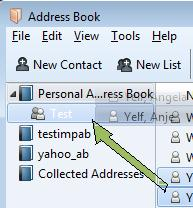
If you have added the contact to an address bookand now you want that contact to appear in that address book's Mailing List:
- Open 'Address Book'
- select the address book with the contact
- locate the contact, left click and hold down to grab
- drag contact to the left and hover over the Mailing List
- release to drop into Mailing List.
see image