


stop pdf's opening in the browser

I have looked at some of the comments about Firefox automatically opening pdf docs. Myu concern is twofold. Most importantly the password in the doc is somehow being overriden; that is a severe security issuen for me. Destroys the whole concept of security. Makes me very uncomfortable and may discontnue using Forefox after more than 15 years. Secondly this caught me by surprise; it only occurred for the first time this morning. How can i overcome this to prevent Firefox from performing merely as a browser?
All Replies (15)
"How can i overcome this to prevent Firefox from performing merely as a browser?"
Do you mean to only be a browser, not 'prevent'
If so, stop FX from opening and use what is the default on your OS which is what by the way :)
amoun மூலமாக திருத்தப்பட்டது
My apologies, not clearly described. I want Firefox to only act as a browser. Other functionality makes me uncomfortable. Thanks for responding so promptly.
Yes thought that's what you meant.
So set the OS to use another app etc.
All the best
Hi John,
If amoun's reply resolved your issue, please consider marking it as a solution to highlight it for other users.
Apart from that, it might be interesting to look into the actual issue you've encountered. I'm pretty sure Firefox isn't supposed (and shouldn't be able to?) change PDF passwords. Could you please share some more details about what happened?
Hello Denys Thanks for your response.
Even though Foxit is set as my default pdf reader, out of the blue Firefox started intercepting. My medical insurance provider's communication - amongst many others - is encrypted with a password. The document opened in Firefox without me tapping in my password. In terms of South Africa's Protection of Personal Information Act, sensitive data such as financial and medical must be password protected. So this breaks the confidentiality. Firefox is supposedly rated as one of the top browsers in terms of privacy and protection and that is why I chose it. If the document arrives via Thunderbird as an attachment it defaults correctly to Foxit, so that part is OK. As an example i logged in to my Medical Insurance website and requested a copy of my latest statement. I clicked on their download button and voila, it opened in a new tab without a request for the password. I have been a member for 30 years and this is the first time it has happened. As i said in my original report this only started some time last week
Sincerely
john coombes
Thank you for clarifying. I've asked the team, and they said that Firefox definitely doesn't override anything when opening PDFs, it just reads info from the files. However, in terms of protection, many things depend on the kind of protection used. For example, if the password is only supposed to prevent editing/printing (but not viewing), it may not be respected by many PDF readers. If you are curious what happens in your particular case, you can send the file to cdenizet@mozilla.com (referencing this question), and the team will take a look at it specifically.
Hello Denis I decided to check the settings in Girefox and discovered 2 things: 1) In Settings the box for "Downloads / Save files to" is set to "Ask where to save files before downloading"; 2) The setting "Files and applications" has the box "Choose how Firefox handles downloaded files and content." is set. So the mystery deepens. I have never altered any of these settings; in fact i have never even looked at them. But the problm persists. As an added investigation i used Brave with the same result. So it appears that this is may not be a specific browser issue. Are there System settings for such options? I have not been able to find any. As i said previously in both browsers the pdf opens automatically without password request. Quite unnerving to say the least. Until some time last week this never occurred. I regularly download pdf docs. Cheers john
Sorry . Denys.
Just another thought. We are dealing here exclusively with .pdf. When 'downloading' via Firefox does the file name extension remain as plain .pdf, or does it change when it is a browser download?
Given "in both browsers the pdf opens automatically without password request. […] Until some time last week this never occurred" I'd err on the side of a) bug on the provider side, b) deliberate change on their side if they no longer encrypt the documents — you might wanna liaise with them.
To test you can use this sample file:
https://sample-files.com/downloads/documents/pdf/protected.pdf
to see if you're asked for a password — this one is positively definitely password–protected.
I lost a message. Probably did not click post. The link above responded as you said, immediate request for a password. But thinking back to my original concern, the main problem is that Firefox is automatically grabbing any pdf i try to download and opening it without my say-so. So the primary question remains "How can i prevent Firefox from grabbing the pdf instaed of asking me where to store it?" Because that is the underlying factor. All i want is to request the pdf file for download into my hard drive for later action. The password problem would disappear if that can be achieved. I have just tested this again. Located a mail that i receive monthly. The supplier embeds the link for the invoice and statement in the mail itself. And this is the change over the past 2 weeks or so; the browser links to the pdf address (somewhere on the supplier's website). Up until now the file woud automatically open in my pdf reader, Foxit. Been doing that forever. Now the file is opened as a new tab in Firefox. That is completely new. So i remain flumoxxed by this latest chapter in tech challenges. Is there a setting somewhere that can prevent the browser from opeining the file? I seem to recall that somewhere, sometimw there was an arfticle about pdfs opening in browsers. But thanks for you ongoing help. I do appreciate it.
Hello
What information is stored in my profile
Download actions: handlers.json This file stores your preferences that tell Firefox what to do when it comes across a particular type of file. For example, these are the settings that tell Firefox to open a PDF file with Acrobat Reader when you click on it. For more information, see Manage file types and download actions in Firefox.
To see, you can try Go to your profile https://support.mozilla.org/en-US/kb/profiles-where-firefox-stores-user-data The explorer will open in the profile folder Next, stop Firefox Next, in your profile, delete the handlers.json file or rename the file (e.g.) handlers.json-old Next, start Firefox
Next, perform your checks A new handlers.json, will be created, automatically
Up until now the file woud automatically open in my pdf reader, Foxit. Been doing that forever. Now the file is opened as a new tab in Firefox. That is completely new.
This is something the server controls to great extent. The vendor might have changed the content disposition on their side, and stopped forcing downloads. This means the documents just view inline now without going through downloads, and to save it locally you'd need to download it explicitly. ("Save link as…" from context menu instead of opening.)
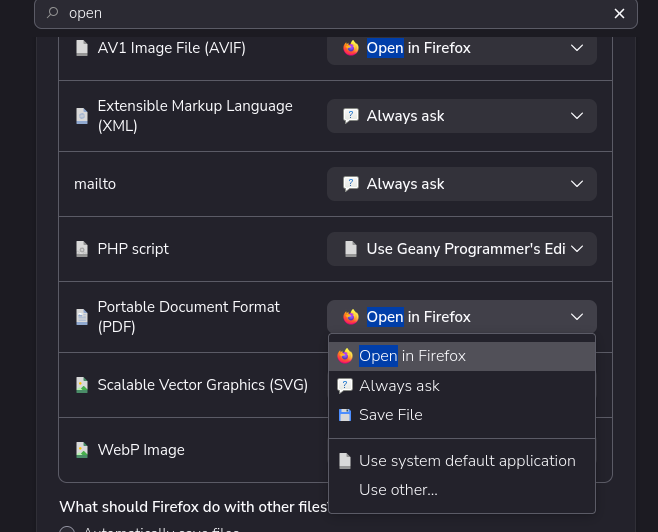
The settings to prefer external app are described in Choose your preferred PDF viewer in Firefox however if you wanted to completely disable the internal reader in case none of the above works for your workflow, you might need to edit the internal configuration so that even inline documents are not treated as content, but as "unknown" attachments potentially downloading all. That might however mean surprises on other sites that you'd expect to just show the PDFs inline, as you'd need to download all of them to view if the internal PDF.js is disabled (see https://support.mozilla.org/questions/943119 …)
Hello
Of course, double-click on pdfjs.disabled to set its value to true, restart Firefox, that's a know bypass, you will no longer see Open in Firefox
Double-click on pdfjs.disabled to set its value to false, restart Firefox, you will see Open in Firefox
For information purposes, about, handlers.json To see, you can open handlers.json with your Notepad, to see the content
Agent virtuel மூலமாக திருத்தப்பட்டது