


yahoo mail spam folder deleted by mistake

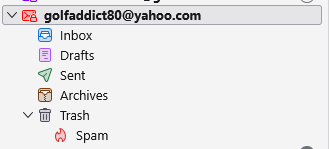
good day....ii hope someone can help. the other day i was accessing my yahoo account spam folder and by accident, i deleted the spam folder instead of emptying it. the spam folder is now sitting in the trash and i'm unable to remove it from there. when i log into my actual yahoo account, the spam folder is where it's supposed to be and not in the trash. i tried removing the yahoo account from thunderbird and reinstalling it in hopes that it would rectify the problem, but it hasn't. does anyone have a solution?? i would greatly appreciate any help you can offer. thank you for your time...mike s
All Replies (8)
Right-click the account in your picture, Subscribe..., Refresh. Can you check the box for Spam?
thank you for your assistance, i can check and clear spam with no problem, but the spam folder is still in the trash, i need to know how to get the spam folder out of the trash and back in the main menu
Can you drag the folder and drop it onto the account top level? Did you try to subscribe the Spam folder?
thank you for your assistance, it will not allow me to drag the spam (bulk) folder back into it's proper place in the menu and yes i have tried the subscribe option and that also did not work
You might be able to move or undelete the folder in webmail. Or, maybe if you empty the Trash in TB, compact the folder, Spam will be available in the Subscribe window. As a last resort, you could remove the account, restart TB, and add it again.
thank you for your assistance, the junk folder does not show up in the trash if you log into yahoo mail through a browser, i have deleted the junk folder in TB, only to have it reappear when i restart TB, i have tried removing the account and reinstalling it only to have the same issue. it appears that there is no solution to this issue. i did manage to find a work around called "folder flags", but unfortunately it wasn't compatible with my current version of TB, back to the drawing board i guess
Did you compact Trash after emptying it? You could also open the profile (Help/Troubleshooting Info, Profile Folder, Open Folder), close TB, open ImapMail/imap.mail.yahoo.com, delete Trash and Trash.msf, restart TB, subscribe Trash and Spam.
i've tried all those things and it hasn't fixed the problem. the bulk folder does not appear in the trash when logged into yahoo mail, only when logged into TB, after an exhausting internet search, there does not appear to be a solution to this issue, even though apparently i'm not the only person to have done this. hopefully somewhere along the line, someone can come up with a fix for this. as i mentioned in a previous response, there was a fix created called "folder flags" , but it won't work on the current version of TB