


How to get rid of "Thunderbird thinks this message is Junk mail"?

I don’t want any spam filters from Thunderbird. “Uncheck Enable adaptive junk mail controls for this account” never worked. https://blog.thunderbird.net/2024/09/thunderbird-and-spam/ The message "Thunderbird thinks this message is Junk mail" still appears. I’ve deleted Bogofilter.sfd, DSPAM.sfd, POPFile.sfd, SpamAssassin.sfd, SpamPal.sfd from Thunderbird.app/Contents/Resources/isp. What else do I need to delete from Thunderbird to get rid of the message "Thunderbird thinks this message is Junk mail"? I’m using Thunderbird 128.9 ESR on macOS 15.4.
தீர்வு தேர்ந்தெடுக்கப்பட்டது
I moved to a new Mac and started from zero. I’ve deleted Bogofilter.sfd, DSPAM.sfd, POPFile.sfd, SpamAssassin.sfd, SpamPal.sfd before setting up the accounts and Thunderbird no longer thinks. I delete the files mentioned above after every update.
Read this answer in context 👍 0All Replies (9)
Not a great idea to randomly delete files.
Are you using an English version of Thunderbird? If you are, I don't think there is an alert "Thunderbird thinks this is junk mail". There is however "This message may be a scam" https://support.mozilla.org/en-US/kb/thunderbirds-scam-detection
Accurate wording in your description is important.
Here it is
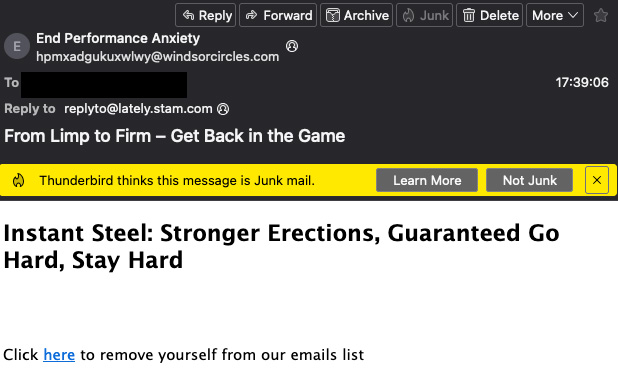
Is that message in your spam folder?
Yes, that message was in Spam, but "Thunderbird thinks” appears in other folders as well.
try deleting training.dat from your profile directory.
Deleting training.dat did not remove “Thunderbird thinks”. I also deleted msgFilterRules.dat
Bogdan, are you still seeing this problem?
> I also deleted msgFilterRules.dat
deleting will remove your filters - which is OK if you have none.
தீர்வு தேர்ந்தெடுக்கப்பட்டது
I moved to a new Mac and started from zero. I’ve deleted Bogofilter.sfd, DSPAM.sfd, POPFile.sfd, SpamAssassin.sfd, SpamPal.sfd before setting up the accounts and Thunderbird no longer thinks. I delete the files mentioned above after every update.
Thanks for the new info.