


encodeURIComponent(), base64_encode() ne marchent plus depuis la derneière version

window.open('data:application/vnd.ms-excel;base64,' + base64_encode(tab_text));
function ExportToExcel(mytblId){
      var htmltable= document.getElementById('my-table-id');
      var html = htmltable.outerHTML;
      window.open('data:application/vnd.ms-excel,' + encodeURIComponent(html));
   }
Ne marche plus sur fireFox depuis la dernière version, j'ai testé sur plein de sites qui utilise la même chose,et ça ne marche pas
All Replies (6)
encodeURIComponent() is a built-in function and should still be working in Firefox 48. However, it does not create a valid data URI.
base64_encode() is not a native JavaScript function; it appears to be a php function, or perhaps it is a function in a script library you are using? In JavaScript, you could try btoa():
https://developer.mozilla.org/docs/Web/API/WindowBase64/btoa
Bonjour, J'ai testé, mais ça ne marche pas. Ci-joint le code Jord Burgos. le csv marche mais pas l'extraction excel.
Merci d'avance. /** /** excellentexport.js**/
* ExcellentExport.
* A client side Javascript export to Excel.
*
* @author: Jordi Burgos (jordiburgos@gmail.com)
*
* Based on:
* https://gist.github.com/insin/1031969
* http://jsfiddle.net/insin/cmewv/
*
* CSV: http://en.wikipedia.org/wiki/Comma-separated_values
*/
/*
* Base64 encoder/decoder from: http://jsperf.com/base64-optimized
*/
/*jslint browser: true, bitwise: true, plusplus: true, vars: true, white: true */
var characters = 'ABCDEFGHIJKLMNOPQRSTUVWXYZabcdefghijklmnopqrstuvwxyz0123456789+/='; var fromCharCode = String.fromCharCode; var INVALID_CHARACTER_ERR = (function () {
       "use strict";
       // fabricate a suitable error object
       try {
           document.createElement('$');
       } catch (error) {
           return error;
       }
   }());
// encoder if (!window.btoa) {
   window.btoa = function (string) {
       "use strict";
       var a, b, b1, b2, b3, b4, c, i = 0, len = string.length, max = Math.max, result = ;
       while (i < len) {
           a = string.charCodeAt(i++) || 0;
           b = string.charCodeAt(i++) || 0;
           c = string.charCodeAt(i++) || 0;
           if (max(a, b, c) > 0xFF) {
               throw INVALID_CHARACTER_ERR;
           }
           b1 = (a >> 2) & 0x3F;
           b2 = ((a & 0x3) << 4) | ((b >> 4) & 0xF);
           b3 = ((b & 0xF) << 2) | ((c >> 6) & 0x3);
           b4 = c & 0x3F;
           if (!b) {
               b3 = b4 = 64;
           } else if (!c) {
               b4 = 64;
           }
           result += characters.charAt(b1) + characters.charAt(b2) + characters.charAt(b3) + characters.charAt(b4);
       }
       return result;
   };
}
// decoder if (!window.atob) {
   window.atob = function(string) {
       "use strict";
       string = string.replace(new RegExp("=+$"), );

       var a, b, b1, b2, b3, b4, c, i = 0, len = string.length, chars = [];
       if (len % 4 === 1) {
           throw INVALID_CHARACTER_ERR;
       }
       while (i < len) {
           b1 = characters.indexOf(string.charAt(i++));
           b2 = characters.indexOf(string.charAt(i++));
           b3 = characters.indexOf(string.charAt(i++));
           b4 = characters.indexOf(string.charAt(i++));
           a = ((b1 & 0x3F) << 2) | ((b2 >> 4) & 0x3);
           b = ((b2 & 0xF) << 4) | ((b3 >> 2) & 0xF);
           c = ((b3 & 0x3) << 6) | (b4 & 0x3F);
           chars.push(fromCharCode(a));
           b && chars.push(fromCharCode(b));
           c && chars.push(fromCharCode(c));
       }
       return chars.join();

   };
}
ExcellentExport = (function() {
   "use strict";
   var version = "1.3";
   var csvSeparator = ',';
   var uri = {excel: 'data:application/vnd.ms-excel;base64,', csv: 'data:application/csv;base64,'};
var template = {excel: '<meta http-equiv="Content-Type" content="text/html; charset=UTF-8">{table} var get = function(element) {
if (!element.nodeType) {
return document.getElementById(element);
}
return element;
};
   var fixCSVField = function(value) {
       var fixedValue = value;
       var addQuotes = (value.indexOf(csvDelimiter) !== -1) || (value.indexOf('\r') !== -1) || (value.indexOf('\n') !== -1);
       var replaceDoubleQuotes = (value.indexOf('"') !== -1);
       if (replaceDoubleQuotes) {
           fixedValue = fixedValue.replace(/"/g, '""');
       }
       if (addQuotes || replaceDoubleQuotes) {
           fixedValue = '"' + fixedValue + '"';
       }
       return fixedValue;
   };
   var tableToCSV = function(table) {
       var data = "";
       var i, j, row, col;
       for (i = 0; i < table.rows.length; i++) {
           row = table.rows[i];
           for (j = 0; j < row.cells.length; j++) {
               col = row.cells[j];
               data = data + (j ? csvDelimiter : ) + fixCSVField(col.textContent.trim());

           }
           data = data + csvNewLine;
       }
       return data;
   };
   var ee = {
       /** @expose */
       excel: function(anchor, table, name) {
           table = get(table);
           var ctx = {worksheet: name || 'Worksheet', table: table.innerHTML};
           var hrefvalue = uri.excel + base64(format(template.excel, ctx));
           anchor.href = hrefvalue;
           // Return true to allow the link to work
           return true;
       },
       /** @expose */
       csv: function(anchor, table, delimiter, newLine) {
           if (delimiter !== undefined && delimiter) {
               csvDelimiter = delimiter;
           }
           if (newLine !== undefined && newLine) {
               csvNewLine = newLine;
           }
           table = get(table);
           var csvData = tableToCSV(table);
           var hrefvalue = uri.csv + base64(csvData);
           anchor.href = hrefvalue;
           return true;
       }
   };
return ee;
}());
/** Index.html. **/
<title>Export to excel test</title>
Export to Excel
Export to CSV - UTF8
Export to CSV - Using semicolon ";" separator - UTF8
| Column 1 | Column "cool" 2 | Column 3 | Column 4 |
|---|---|---|---|
| 100,111 | 200 | 300 | áéíóú |
| 400 | 500 | 600 | àèìòù |
| Text | More text | Text with new line | ç ñ ÄËÏÖÜ äëïöü |
hi, support.mozilla.org is intended for end-user support. if you have a question regarding web development please refer to Where to go for developer support instead. thank you for your understanding!
Hello, Have you checked before answering me?!. I do not have a programming problem. Everything worked on my applications and full else on the web that uses the "end-user". but from version 48, nothing works.
This is not serious, it was just to tell you, because I love Firefox. But full user starts to go to Chrome, with Chrome, because it works.
Bonjour, Avez-vous vérifié avant de me répondre?!. je n'ai pas un problème de programmation. Tout marchait bien sur mes applications et sur pleines d'autre sur le WEB que utilise le "end-user ". mais à partir de la version 48, rien ne marche.
Ce n'est pas grave, c'était juste pour vous informer, car j'aime Firefox. Mais plein d'utilisateur commence à aller vers Chrome car avec chrome ça marche.
If I try the "Export table to Excel" table in the 2014 article, both Firefox and Chrome open Excel without any workbook. When I look at the .xls file on disk -- Firefox and Chrome receive the identical file -- it doesn't seem to be in any recognizable Excel format (screen shot attached).
Do you have a more current or relevant link to test?
Note: I'm testing with Excel 2010 on Windows.
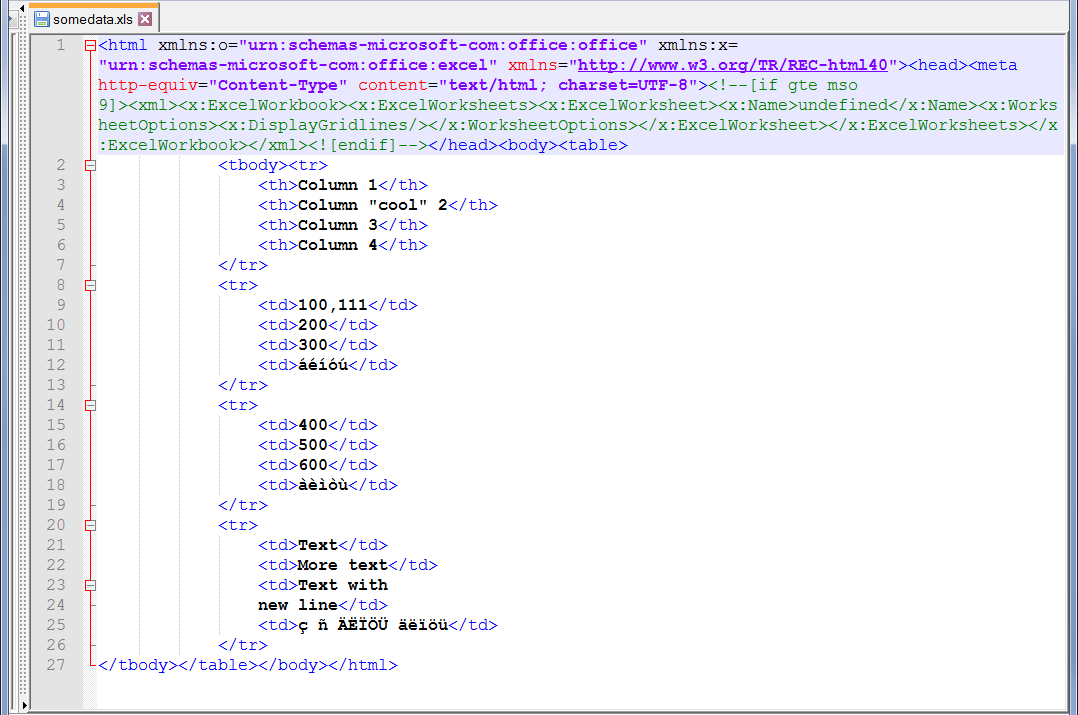
jscher2000 - Support Volunteer மூலமாக திருத்தப்பட்டது