


Why won't Firefox load Google any more?

I've been able to get Google for eons via Firefox but suddenly I'm getting This Connection is Untrusted'. What happened? How do I fix? I've got 9 groups set up: how can I make sure that I won't lose them if I have to do something drastic! Thanks
தீர்வு தேர்ந்தெடுக்கப்பட்டது
These are some links I found about 6 months ago. I think there are separate articles for PURE.
- See Opera section of this one: http://support.kaspersky.com/us/9093#block1
- Manual steps using classic menu bar (tap the Alt key to display it): http://support.kaspersky.com/5414
All Replies (6)
hello, first please make sure that the date, time & timezone are set correctly on your system. if this doesn't solve the issue (or it is already set properly), a possible solution depends on different factors:
- what is the error code shown under technical details on the error page?
in case the error code equals sec_error_unknown_issuer, please attempt to add an exception on the bottom of the error page in order to inspect the certificate like it is shown on the screenshot attached:
- which issuer information does the certificate contain?
please report back with those two pieces of information. thank you!
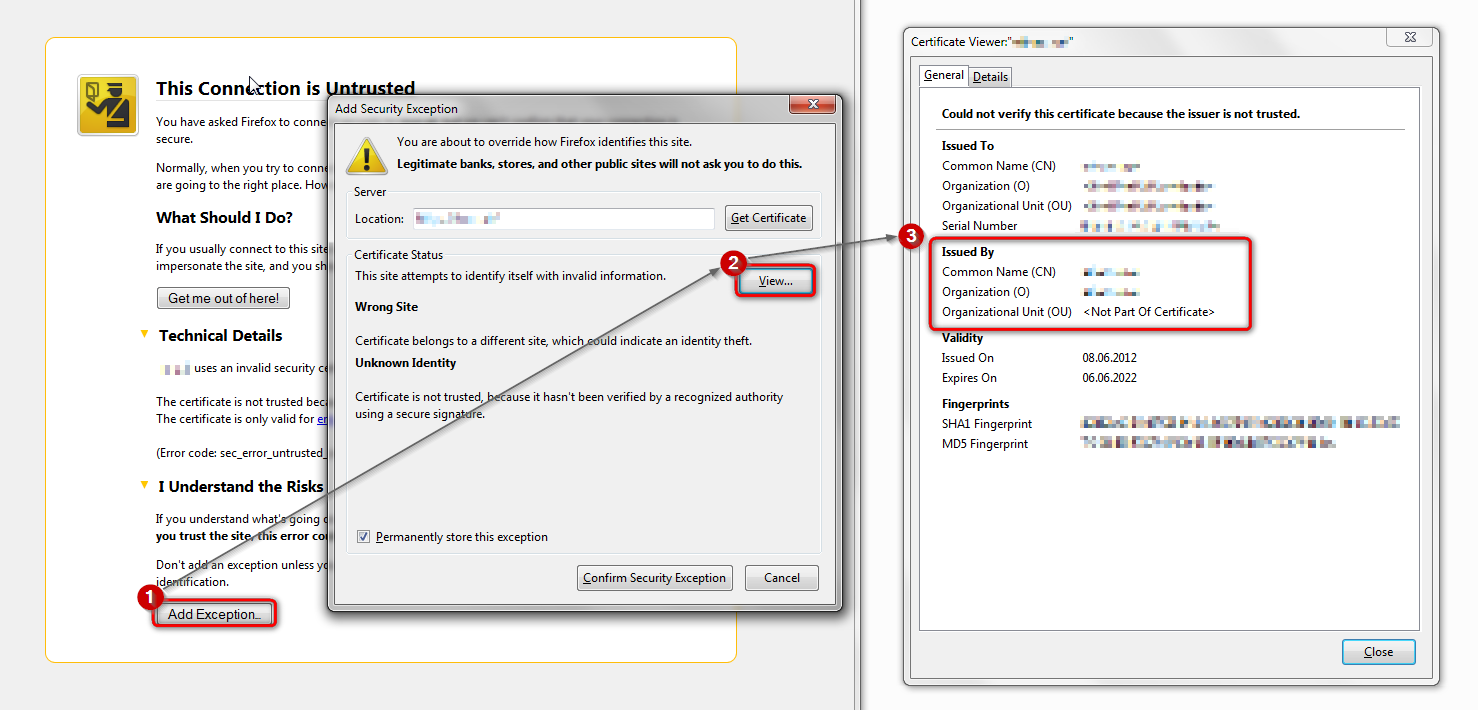
Hello Philip
Thank you for replying:) Here is the information you requested:
- date etc all fine (already set properly) - error code is as you anticipated 'sec_error_unknown_issuer' - issuer information in the certificate is 'Kaspersky Anti-Virus Personal Root Certificate'
The only thing that's changed on my pc recently is that i upgraded to the 2015 version of Kaspersky
great, thank you - this means that kaspersky is intercepting secure connections but hasn't properly embedded its certificate into the firefox trust store so the browser does not know what is intercepting and therefore shows the error you have referenced. you could either try reinstalling kaspersky 2015 and see if this can address the issue or otherwise disable the option to "Scan encrypted connections" within its settings...
Thanks.
I've just had a mooch around Kaspersky settings but can't find an option to 'Scan encrypted connections'. I'll have a go at reinstalling it tomorrow after firing off a Help request to Kaspersky.
Thanks so much for pointing me in the right direction:)
தீர்வு தேர்ந்தெடுக்கப்பட்டது
These are some links I found about 6 months ago. I think there are separate articles for PURE.
- See Opera section of this one: http://support.kaspersky.com/us/9093#block1
- Manual steps using classic menu bar (tap the Alt key to display it): http://support.kaspersky.com/5414
Thanks jscher2000. I took the option to do the manual steps and it worked a treat. I've got no idea about 'certificates' so that was an interesting exercise for me to go through. However - I can now use Google again yay. Thank you:)