


why is vitaminshoppe website not secure it does not show a green padlock?

vitaminshoppe.com website is not secure it does not show a green padlock any help will be helpful.
Chosen solution
Thank you for your help I do see a https but no padlock can I still safely shop online?
Read this answer in context 👍 0All Replies (5)
This website doesn't have a certificate installed and only supports an open HTTP connection, so you can't get a padlock that indicates a secure connection.
For most of your shopping, until you click secure checkout, the site forces HTTP. This is similar to how Amazon works, and does compromise your privacy to some extent because all along the path between your computer and the site, the products you look at could be recorded.
Once you get into the checkout flow, there is a problem with mixed display content, or insecurely loaded images in a secure page. When I check the Page Info dialog, Media list, I only see one that is on HTTP instead of HTTPS, and it seems like an error. (Screen shot attached.)
Usually mixed display content does not pose a serious threat to your privacy, but for more information, see: Mixed content blocking in Firefox.
I'm not sure this is anything to worry about, but I'm not actually going to buy anything...
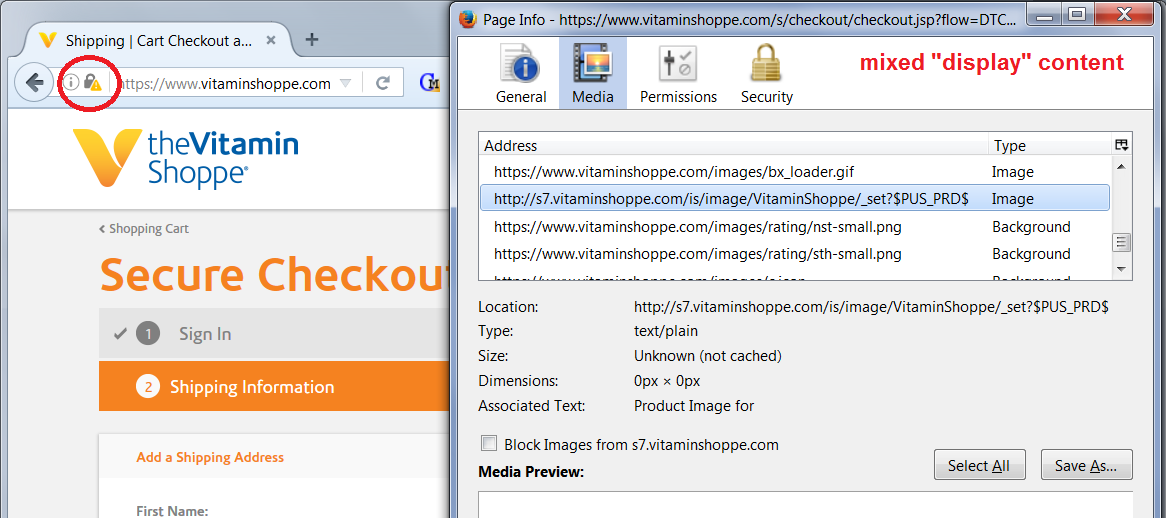
Modified by jscher2000 - Support Volunteer
Suluhisho teule
Thank you for your help I do see a https but no padlock can I still safely shop online?
cor-el said
This website doesn't have a certificate installed and only supports an open HTTP connection, so you can't get a padlock that indicates a secure connection.
Thank you for your help
Note that you can see in the Web Console ("3-bar" menu button or Tools > Web Developer) what mixed content is present on a web page.

Modified by cor-el