


HOw can I edit the dictionary in 38.1.0?

I have inadvertently added an incorrectly spelt word to the dictionary in my email client (Thunderbird 38.1.0). I wish to edit the dictionary to remove this error. I cannot find a way to achieve this.
Can anyone help?
Suluhisho teule
Excellent Zenos. That worked beautifully. Thank you for the help. Cheers Neil
All Replies (4)
The spell check dialogue window has an "Edit" button. So open a Write window, provoke it to check the spelling and click this button.
When you add words, you add them to your personal dictionary; you don't alter the main dictionary file.
Thanks for the idea, Zenos - but the dialogue box doesn't have an Edit line that I can detect. See attached screen print. I'm still puzzled.
Cheers
Neil
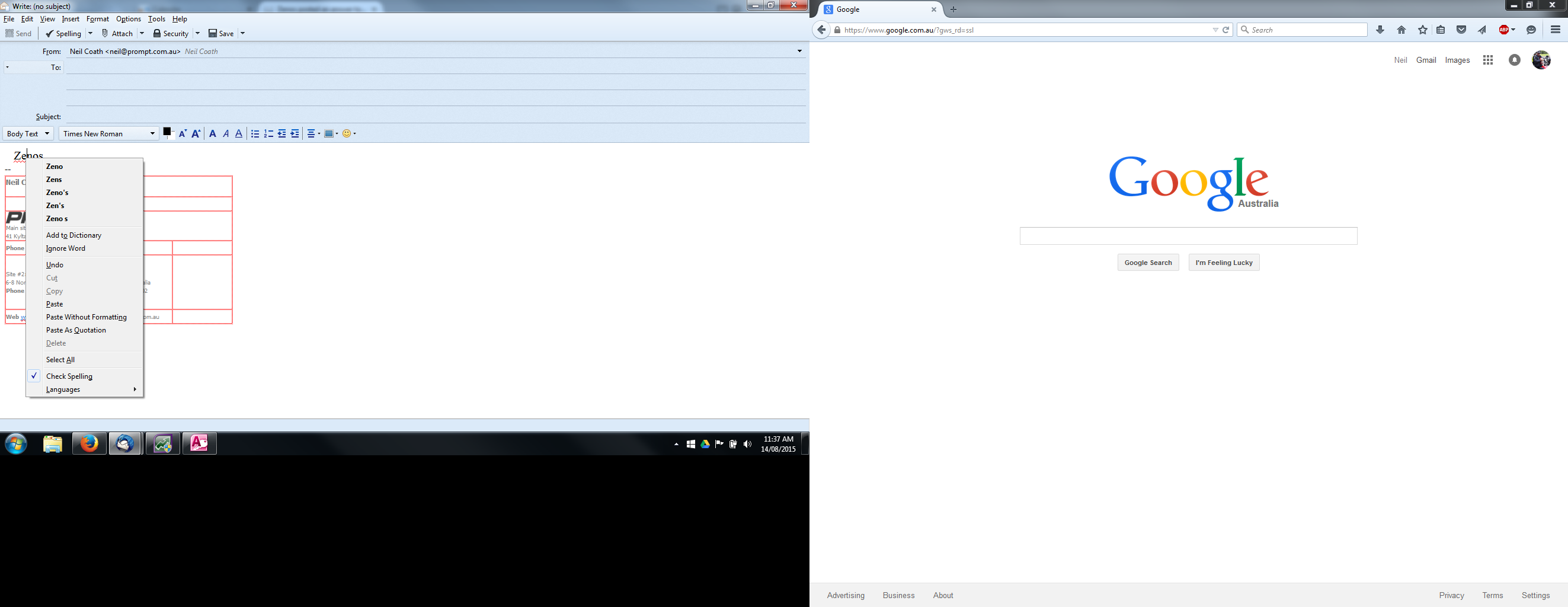
Ah! You have right-clicked the offending word.
Try the spell check button in Thunderbird's toolbar, and you should see this:

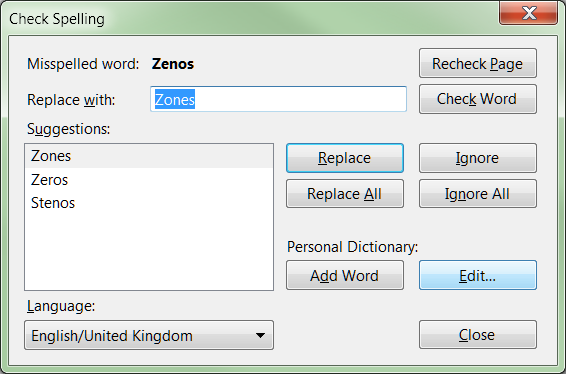
Modified by Zenos
Suluhisho teule
Excellent Zenos. That worked beautifully. Thank you for the help. Cheers Neil