


Thunderbird reinstall, cannot connect to recent profile. Appears to have installed in two locations.

Hi, hoping someone could help as I am struggling to get my information back. I am using Ubuntu Cinnamon.
Thunderbird crashed last night, wouldn't work, tried safe mode. Nothing fixed it. It hung when opening up and after 30 seconds said force quit. So I was forced to reinstall. I did a manual backup but not using the inbuilt tool as I couldn't get into Thunderbird. I just copied the data from username/.thunderbird
After spending a long time uninstalling. Because it reached 78% and then crashed on uninstall. Eventually after reading various pages on the internet I managed to reinstall from the Ubuntu software manager using the latest snap version. (Which I am not sure was what was actually installed previously).
However having used thunderbird for nearly 20 years or so. I have a username/.thunderbird folder. And when I moved to this platform, I have a snap/thunderbird/common/.thunderbird folder.
I installed this new distro 2 years ago, and remember having issues getting my data into the system under Snap. But eventually got it to work somehow back then.
However since reinstalling I cannot see the last 2 years of emails, archives or data. It has launched into a 2 year old profile. I appear to have lost most of the emails from the archive folders (but kept the folders) removed all of the personal folders but then dumped all those emails into my inbox. Giving me 6500 emails that were in various personal folders. (I don't get 6500 emails in a year so don't know what has happened.) It has even changed all of the new dates to the US format, so nothing makes any sense.
I now have 2 Thunderbird profiles, over 12GB in size. And have apparently lost 2 years of my life. But reading support pages, suggests I should be okay because thunderbird doesn't delete data when you reinstall?
I have looked through various other threads which talk about pointing it at the profiles and mail boxes, however nothing works.
Any help much needed.
Alla svar (9)
First, I am not a linux guru, but I am aware that different distributions install in different locations. Are you wanting to use one of the profiles? Or are you wanting to merge two profiles? Knowing that may help get the help you want.
david said
First, I am not a linux guru, but I am aware that different distributions install in different locations. Are you wanting to use one of the profiles? Or are you wanting to merge two profiles? Knowing that may help get the help you want.
I just want to access either profile that works. Historically the username/.thunderbird is the one that I have brought across from previous versions of Linux (I had mint before this one.). I didn't know about snap being a different until I installed thunderbird and then somehow I got it to work 2 years ago. Either importing or bringing it in by pointing the profile perhaps?
Ideally I don't care which one works. I just need my emails back to be honest. It appears that despite using it daily, thunderbird just hasn't been saving anything for two years. Which I know isn't true. So I assume lost in the config or folder there is something I am missing to make it find the information.
Okay, since the active profile is not the one you want, try these steps:
- click help>troubleshootinginformation
- scroll to 'profile folder' and click 'open folde'r
- exit thunderbird
- you should now be in the profile. You can confirm that as you should see a listing of files, one of which would be abook.sqlite. DELETE everything here
- now open one of your saved profile folders, Here also, you should see the abook.sqlite file there.. That confirms that you have opened a valid profile.
- next, copy ALL of the profile and paste it into the active profile that you just emptied
- if there is a compatibility.ini file, delete it.
- restart thunderbird and it should start successfully if the profile is not corrupt.
david said
Okay, since the active profile is not the one you want, try these steps:
- click help>troubleshootinginformation
- scroll to 'profile folder' and click 'open folde'r
- exit thunderbird
- you should now be in the profile. You can confirm that as you should see a listing of files, one of which would be abook.sqlite. DELETE everything here
- now open one of your saved profile folders, Here also, you should see the abook.sqlite file there.. That confirms that you have opened a valid profile.
- next, copy ALL of the profile and paste it into the active profile that you just emptied
- if there is a compatibility.ini file, delete it.
- restart thunderbird and it should start successfully if the profile is not corrupt.
Hi, To clarify. DELETE everything here. Do you mean everything in that folder, including the abook.sqlite and all files and subfolders?
Yes, everything. This is not the profile you want and you need to replace everything. If unsure, then copy the contents elsewhere first.
david said
Yes, everything. This is not the profile you want and you need to replace everything. If unsure, then copy the contents elsewhere first.
Sadly that didn't work.
I did figure out that deleting the username/.thunderbird, also deletes the snap/common version. So I only have 1 x 12 GB of data I can't seem to access and that is dated 2 years old.
Any other thoughts?
Looking in troubleshooting help I saw that I have a .main profile and a default profile.
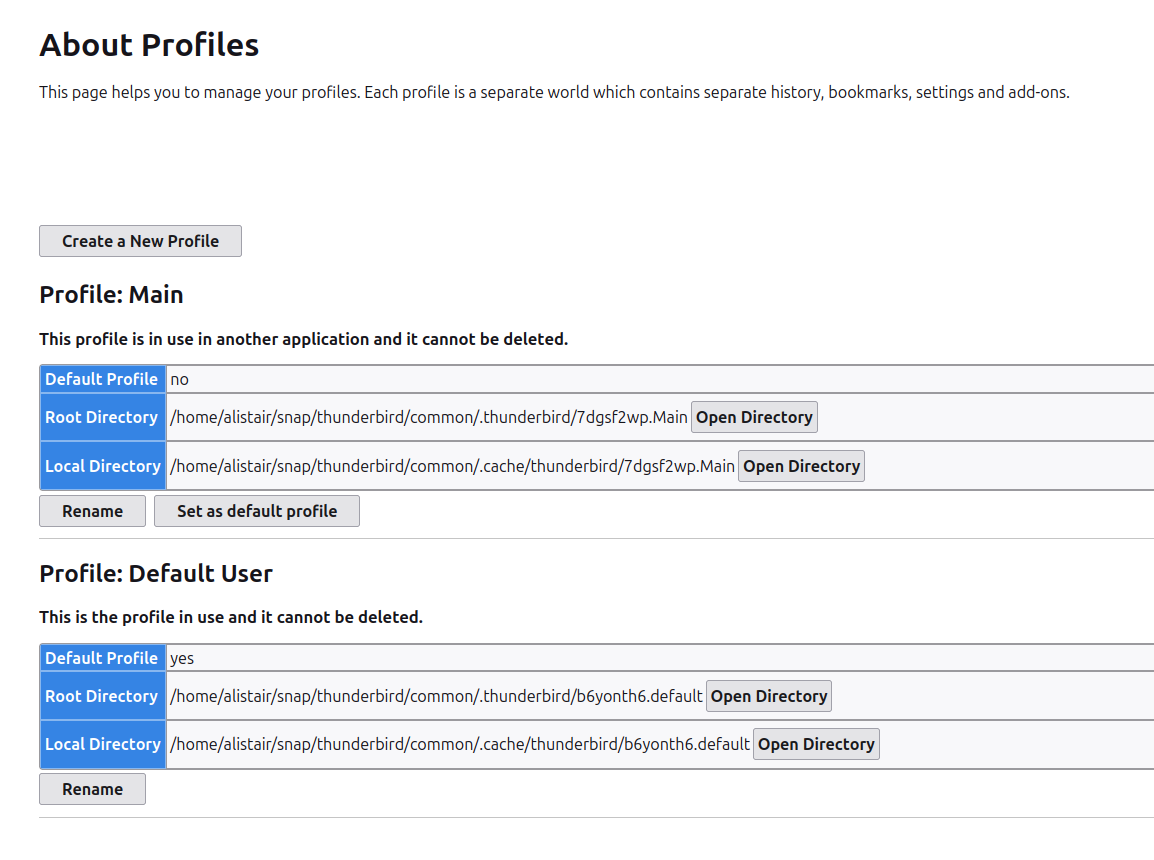
It may help to explain what didn't work. There were 8 steps. Did one of the fail? Or did you get through them and have error restarting? If so, what was the error message?
david said
It may help to explain what didn't work. There were 8 steps. Did one of the fail? Or did you get through them and have error restarting? If so, what was the error message?
My apologies, that would have been helpful.
I got through all of it and it came out exactly the same. So I had the same 2024 dated emails and nothing recent. I am hoping that it is pulling information from another place or another profiled?
That indicates we were working with the wrong profile. Try this:
- locate each potential profile
- review the imapmail folder for IMAP accounts and the Mail folder for POP.. Look for the size of the folders in each to see where the big ones are. That should indicate where the missing messages are. If unsure post screenshots of the folders.