


Why Does Task Manager Show 14 or Above Always Beside Task Manager?

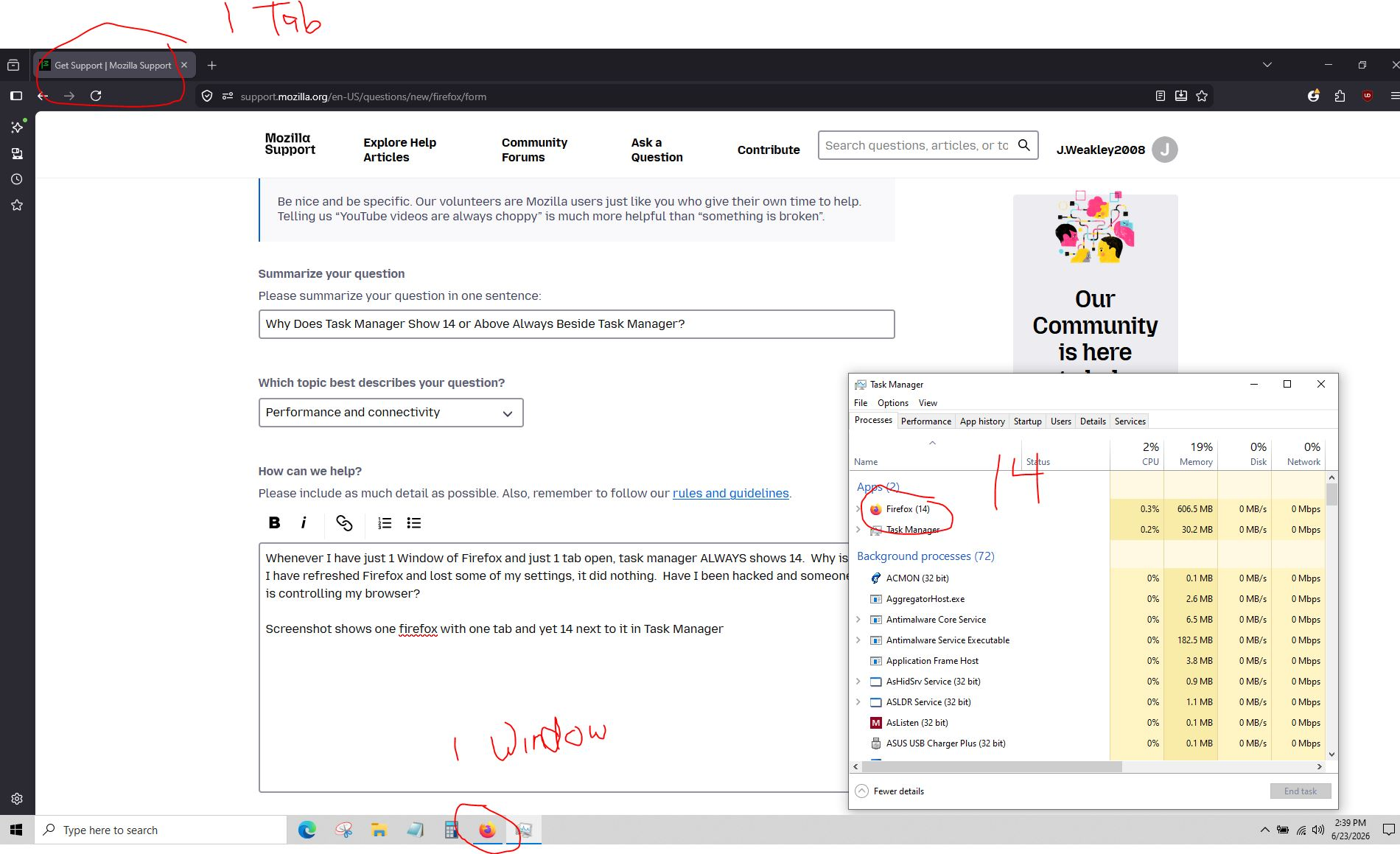
Whenever I have just 1 Window of Firefox and just 1 tab open, task manager ALWAYS shows 14. Why is this? I have refreshed Firefox and lost some of my settings, it did nothing. Have I been hacked and someone else is controlling my browser?
Screenshot shows one firefox with one tab and yet 14 next to it in Task Manager
Vald lösning
These are processes, Firefox is a multiprocess application. One process is for network, another for GPU, and so on. You can find full list on the about:processes page.
Alla svar (4)
Are you curious about the fact that it's the number 14, or that it's always the same number with one tab?
It's not always the same number with one tab, although a majority of the time it's 14 with one tab. I guess my issue is why is it such a large number. I have seen 16 with just one tab, but I've also seen 16 with two tabs. A few minutes ago I had three tabs open and the number was 23. I'm just concerned something nefarious is going on. I refreshed Firefox (and lost a lot of my settings) and nothing changes.
I apologize if this is a dumb question, and I thank you for your response.
Vald lösning
These are processes, Firefox is a multiprocess application. One process is for network, another for GPU, and so on. You can find full list on the about:processes page.
TyDraniu said
These are processes, Firefox is a multiprocess application. One process is for network, another for GPU, and so on. You can find full list on the about:processes page.
Okay, thank you. I don't really understand all that stuff on the about process tab, and thus have no way of knowing whether something nefarious is going on or not, but I do now see why the numbers are there, (lol, I literally counted them to see if they matched the number on task manager, and they did) but I at least have an explanation as to why.
Again, thank you very much. I know I'm an idiot when it comes to this stuff, but my one concern is whether something nefarious is going on. I use the standard anti-virus stuff and scan occasionally with Malwarebytes, but at times it just seems things aren't behaving right. Like today when every time I opened up Firefox, it opened up all the tabs I had previously open when I closed it, despite NOT changing anything in settings. It was as if somehow the "open previous tabs on startup" option had checked itself.
Plus, I have the Firefox Home as my home page, and now, out of the blue, one of the links that shows on my row is Amazon search, and it won't let me dismiss it (using the Dismiss option when clicking the 3 dots above it). I was able to dismiss the other ones that I didn't want but not that one. (NOTE: I started a separate question about that issue today as well.)
Thanks again.