


Windows 10 reached EOS (end of support) on October 14, 2025. If you are on Windows 10, see this article.

Sök i support

Akta dig för supportbedrägerier: Vi kommer aldrig att be dig att ringa eller skicka ett sms till ett telefonnummer eller dela personlig information. Rapportera misstänkt aktivitet med alternativet "Rapportera missbruk".

Läs mer

High GPU usage on Google Search AI Overviews - Firefox 149.0.2 (macOS) - Chrome is fine

  • 2 svar
  • 1 har detta problem
  • 54 visningar
  • Senaste svar av Agent virtuel
  • Öppen

Hello,

I am reporting a performance issue specifically related to Google Search's AI features (AI Overviews) in Firefox 149.0.2 on macOS.

The Issue: When an AI-generated summary appears in Google Search results, GPU usage spikes significantly, reaching up to 212%. This causes the laptop to overheat and triggers high fan speeds.

Critical Comparison:

Firefox 149.0.2: Extreme GPU load and performance degradation when rendering Google AI elements.

Google Chrome 147.0.7727.56: Works perfectly with normal GPU usage under the same conditions.

Tested on two different MacBooks: MacBook Pro (A1502), 16GB RAM, i7 (2015) — OS: macOS Monterey. MacBook Pro (MMQX3), 64GB RAM, M1 Max (2021) — OS: macOS Sequoia (15.x/Tahoe).
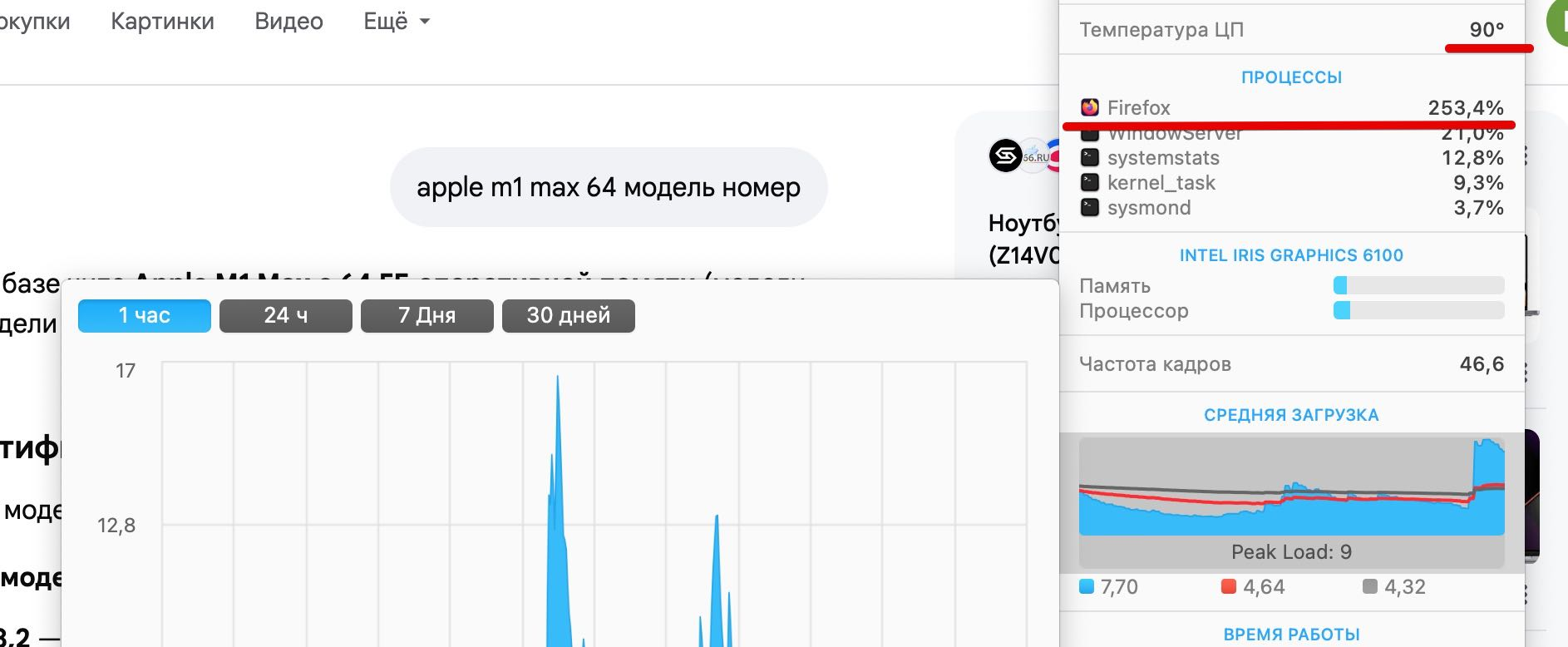

Hello, I am reporting a performance issue specifically related to Google Search's AI features (AI Overviews) in Firefox 149.0.2 on macOS. The Issue: When an AI-generated summary appears in Google Search results, GPU usage spikes significantly, reaching up to 212%. This causes the laptop to overheat and triggers high fan speeds. Critical Comparison: Firefox 149.0.2: Extreme GPU load and performance degradation when rendering Google AI elements. Google Chrome 147.0.7727.56: Works perfectly with normal GPU usage under the same conditions. Tested on two different MacBooks: MacBook Pro (A1502), 16GB RAM, i7 (2015) — OS: macOS Monterey. MacBook Pro (MMQX3), 64GB RAM, M1 Max (2021) — OS: macOS Sequoia (15.x/Tahoe).
Bifogade skärmdumpar

Alla svar (2)

Hello

Apparently, a similar subject https://bugzilla.mozilla.org/show_bug.cgi?id=2032772

For information, you can test, add custom search engines in Firefox https://support.mozilla.org/en-US/kb/add-custom-search-engine-firefox

4. In the URL with %s in place of the search term field, copy & paste the URL of the custom search engine.

https://www.google.com/search?udm=14&q=%s
Ställ en fråga

Du måste logga in på ditt konto för att svara på inlägg. Vänligen starta en ny fråga om du inte har ett konto ännu.